
Description
SoftIcon Poll adds a Poll block to the block editor. Write the question and the answers right in the block, publish, and visitors vote. The votes stay in your own WordPress database: no sign-up, no outside service, and nothing about your visitors is sent anywhere. For the Classic Editor and page builders, every poll also has a shortcode.
Documentation | Demo | Pricing | Support
Video tutorials: SoftIcon Poll in 30 seconds and members-only polls.
Why choose SoftIcon Poll?
- Block first – the question and answers are edited in place, and the results can be previewed in the editor with your colors.
- Your data stays with you – votes are saved in a table on your own site. Nothing about your visitors or their votes is sent to another server.
- Works with caching plugins – the page can be cached; the vote and the results come from your site’s REST API.
- One vote per person – by account for logged-in visitors, otherwise by a browser cookie and a scrambled code made from the IP address. The IP address itself is never saved.
- Accessible – real radio buttons and checkboxes, full keyboard use, and the results are read out to screen readers.
Features
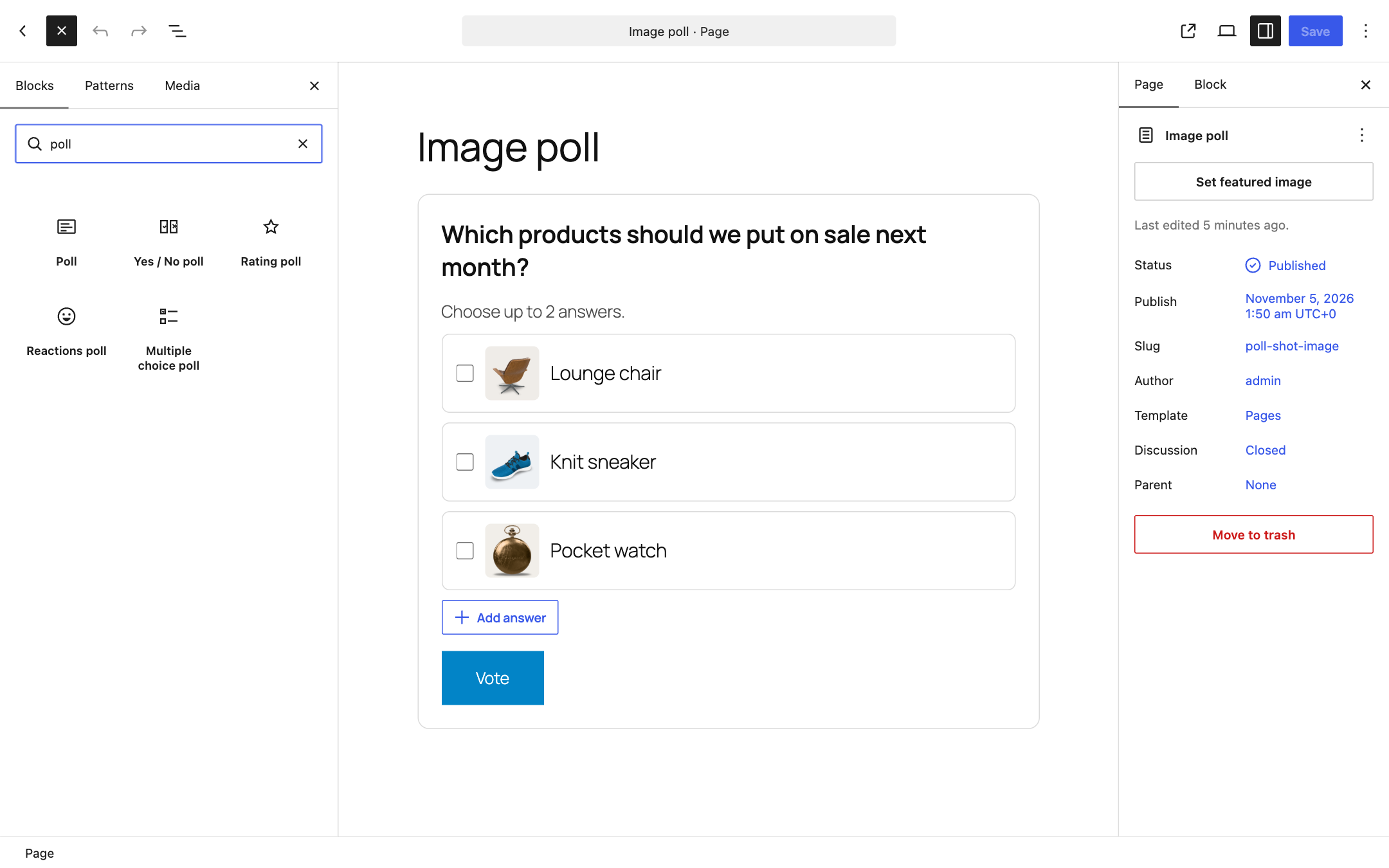
- Question and any number of answers, with an optional image for each answer
- Answers as a list, or as image cards in 2, 3 or 4 columns
- Shuffle the answers, so each visitor sees them in a new order
- Ready-made polls in the inserter: Yes / No, Rating, Reactions (emoji) and Multiple choice
- One answer, or several answers with an optional limit (“Choose up to 2 answers”)
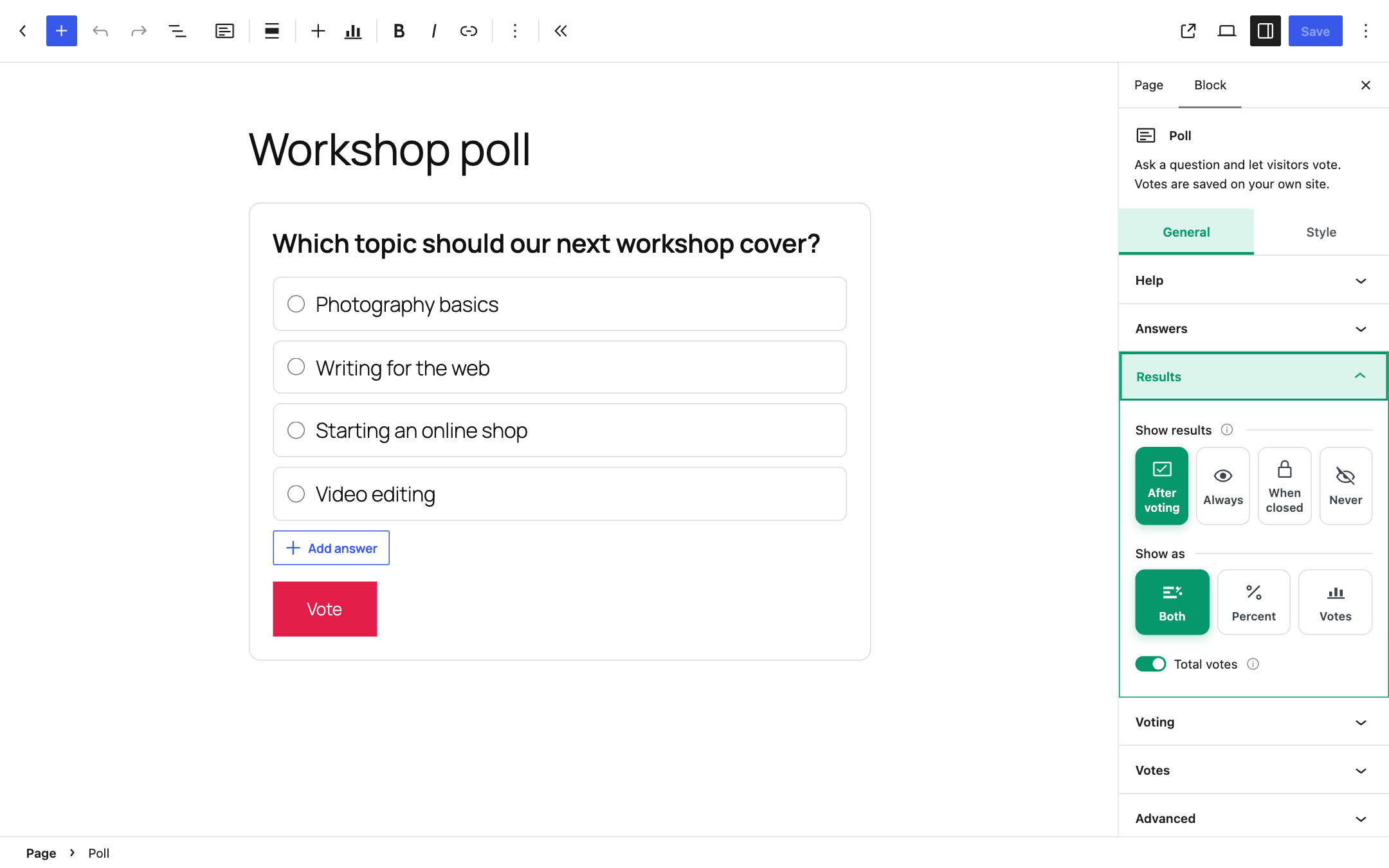
- Show the results after voting, always (with a “View results” link), only when the poll is closed, or never
- Results as percent, number of votes or both, with animated bars and the total number of votes
- Results sorted with the most votes first (optional), and a “Your vote” tag beside the visitor’s answer
- Four designs: Default, Card, Minimal and Pill
- Your own text for the Vote button and the thank-you message
- End date and time, or close the poll by hand, with an optional countdown (“Voting ends in 3 hours”)
- Only logged-in users can vote (optional); others get a link to log in and come back
- Current results and a “Reset votes” button in the block settings
- Colors for the background, text, accent, bars, border and the Vote button; font size and corner radius; wide and full width alignment
- Works in posts, pages, synced patterns, templates and template parts (for example a poll in the footer of every page)
- A shortcode for the Classic Editor, widgets and page builders such as Elementor, Divi, Beaver Builder, WPBakery, Bricks and Oxygen, for example
[softicon_poll id="123"] - Translation ready and right-to-left ready
Members-only polls
Only want members to vote? Turn on “Only logged-in users” in the Voting panel. Visitors who are not logged in still see the poll, with a link to log in, and come right back to the same page to vote. Each account votes once.
SoftIcon Poll Pro
Everything above stays free, with no limits on polls, answers or votes. SoftIcon Poll Pro is a separate plugin for sites that want more from their polls:
- Analytics – votes over time and per answer, by hour, day or month, for today, 7, 30 or 90 days, all time or your own dates.
- CSV export – every vote, a summary per answer, or all polls at once.
- Live results – the results on the page update by themselves while people watch, for events and classes.
- QR code and vote page – people scan the code and vote on a page with only this poll.
- Presentation mode – big full-screen results with the QR code, for a projector.
- “Other” written answer – visitors write their own answer; you read them all in Analytics.
- CAPTCHA – Cloudflare Turnstile, hCaptcha or Google reCAPTCHA v3 stop robot votes, checked on your server.
- Vote again – once an hour, a day or a week, for contests.
- Change the vote – voters can pick another answer while the poll is open.
- Voting by role – only the user roles you choose can vote.
- Vote limit – the poll closes by itself after a number of votes.
- Pie, donut and column charts – show the results the way that fits your page.
- Results rules – hide the results until a number of votes, or show them only to some roles.
Pro replaces the free plugin when you activate it, and every poll and vote you have keeps working. Prices and a full comparison are in Poll Pricing in your dashboard.
Try Pro without risk: start with a free trial from Poll Pricing, no card needed, and every Pro plan comes with a 14-day money-back guarantee. Any problem or question, before or after you buy, email us at support@softiconai.com. We build SoftIcon Poll for the people who use it, and your satisfaction comes first.
Third-party libraries
- Freemius Checkout 1.5.1 (npm package @freemius/checkout) by Freemius – github.com/Freemius/freemius-checkout-js – MIT License. Bundled in build/dashboard.js, it opens the Pro checkout window on the Poll dashboard when you click Get Pro. License in build/freemius-checkout-LICENSE.txt.
The unminified source of this plugin is in the src folder, with package.json and webpack.config.js. Build it with npm install and npm run build.
Development
The plugin is developed on GitHub: github.com/softiconai/softicon-poll. Bug reports and pull requests are welcome there; for help, use the support forum here on WordPress.org.
Screenshots





Blocks
This plugin provides 1 block.
- Poll Ask a question and let visitors vote. Votes are saved on your own site.
Installation
- In your WordPress admin go to Plugins > Add New, search for “SoftIcon Poll” and click Install, then Activate. Or upload the plugin folder to
/wp-content/plugins/and activate it on the Plugins screen. - Edit a post or page, add the Poll block (or search for “poll”), write the question and the answers.
- Choose when the results show, an end date and the colors in the block settings, then publish.
FAQ
-
Do I need an account or an outside service?
-
No. Everything runs on your own site, and the votes are saved in your own database (in a table named
wp_alpl_votes, with your table prefix). The only outside service is an optional opt-in for you, the site admin; see “Does the plugin collect any data?”. -
How does “one vote per person” work?
-
A logged-in visitor votes once per account. A visitor who is not logged in is recognised by a browser cookie and by a scrambled code made from the IP address, so clearing cookies does not allow a second vote.
People who share one internet connection, for example a family or an office, share one IP address, so only one of them can vote while not logged in. If that matters for your poll, turn on “Only logged-in users” in the Voting panel: then every account votes once. See how in this video: Members-only polls.
-
My site is behind Cloudflare or another proxy. Does that matter?
-
Behind Cloudflare the plugin reads the visitor’s real address from Cloudflare’s header, but only when the request really comes from Cloudflare, so the header can’t be faked.
Behind another proxy or load balancer, every visitor may seem to come from the proxy’s address, and then only one vote would be possible. Return the real address with the
alpl_voter_ipfilter, for example:add_filter( 'alpl_voter_ip', function ( $ip ) { return $_SERVER['HTTP_X_REAL_IP'] ?? $ip; } );Only do this when your proxy always sets that header, or visitors could fake it.
-
Does it work with caching plugins?
-
Yes. The page holds only the question and answers. Whether the visitor has voted, and the results, are loaded from your site when the poll comes into view, so a cached page still shows the current results and a poll you have closed.
-
Why do the percentages add up to more than 100%?
-
Only in polls that allow several answers. The percent is the share of people who voted that picked that answer, so if every voter picks two answers the shares add up to 200%.
-
Does it work with the Classic Editor or page builders?
-
Yes. Go to Poll All Polls in the admin menu, click Add a poll, write the question and answers in the block editor and publish it. The list shows its shortcode, such as
[softicon_poll id="123"], and a click copies it. Paste it in the Classic Editor, a text widget, Elementor’s Shortcode widget (the poll shows in Elementor’s preview too), a Code module in Divi, an HTML module in Beaver Builder, a Text Block in WPBakery, or the Shortcode element in Bricks and Oxygen. Change the poll there later and every page with its shortcode shows the change. All pages with the same shortcode share one set of votes. Poll Dashboard lists every poll on the site, with its shortcode, under the Polls tab. -
Yes, with a block theme: add it to a template or template part (for example the footer) in the Site Editor, and it works on every page that uses it. With a classic theme’s widget area, put the poll’s shortcode in a Shortcode or Text widget, or put the poll in a synced pattern and add that pattern to the widget area.
-
What happens if I copy a poll to another post?
-
The copy gets its own new id when you open it in the editor, so the two polls keep separate votes. A poll inside a synced pattern keeps one set of votes wherever the pattern is used.
-
How do I reset the votes?
-
Select the poll, open the Votes panel in the block settings and click “Reset votes”. You are asked to confirm first.
-
Is it GDPR friendly?
-
The plugin saves the chosen answers and a scrambled code made from the user account or the IP address; the code can’t be turned back into the address. Visitors who are not logged in get a cookie named
alpl_voted_followed by the poll’s id, for one year. Suggested text for your privacy policy is added under Settings > Privacy > Policy Guide. -
Does the plugin collect any data?
-
From your visitors: nothing. The votes are saved on your own site, and nothing about your visitors is sent anywhere.
From you, the site admin: only if you say yes. After activation, a short screen asks if you would like to opt in. Click “Skip” and nothing about you or your site is ever sent; the plugin works exactly the same either way. If you allow it, Freemius may email you a confirmation link (it can land in your spam folder); nothing is sent until you click it.
If you click “Allow & Continue”, this is shared with us through Freemius, the service we use to manage our users:
- Your profile: your first name, last name and email address.
- Your site: the site address, title and language, and an anonymous site ID (a one-way code made on your site, so the same site is not counted twice).
- Versions: your WordPress, PHP and SoftIcon Poll versions.
- Plugin events: when the plugin is activated, deactivated, updated or deleted.
We never collect your posts, pages, polls or votes, anything about your visitors, or the list of your other plugins and themes.
Why we ask: to email you about security fixes and important new features, to know which WordPress and PHP versions we must keep supporting, and to learn what to improve.
Changed your mind? Click “Opt Out” under SoftIcon Poll on the Plugins page and nothing more is sent. To have your data deleted, email us at support@softiconai.com.
When you deactivate the plugin, a short form asks why. Answering is optional (“Skip & Deactivate” is always there). If you choose a reason, it is sent only when you delete the plugin. If you never opted in, only the reason and the anonymous site ID are sent, never your name or email.
-
Why a small built-in opt-in instead of the Freemius SDK?
-
We only need the opt-in, so SoftIcon Poll uses its own small client in the vendor/fs-lite folder instead of the full Freemius SDK:
- A lighter plugin: about 3.8 MB less on your server.
- Easy to check: one plain PHP file (vendor/fs-lite/fs-lite.php) that shows exactly what is sent and when.
- Only Freemius: it connects to wp.freemius.com and api.freemius.com and nowhere else. Anything about you or your site is sent only after you click “Allow & Continue”.
- Works on strict hosts too: if your server is not allowed to reach Freemius, your browser sends the same opt-in to wp.freemius.com instead, and Freemius sends you back to your site.
- Nothing extra in your admin: no added menus, and its scripts load only on the Plugins page and its own opt-in screen.
-
Which outside services does the plugin use?
-
Polls on your pages use none. Only in the admin:
- Freemius (wp.freemius.com, api.freemius.com) for the optional opt-in described above, only if you allow it. Terms, privacy policy.
- Freemius plans (api.freemius.com): when you open the Pricing or Free vs Pro tab of the Poll dashboard, it reads the Pro features and prices we set in Freemius. The answer is kept for 12 hours (1 hour if Freemius could not be reached or has no Pro plan yet). Only the plugin’s public ID is sent, nothing about you or your site, and this happens even if you skipped the opt-in.
- Freemius Checkout (checkout.freemius.com) opens in a window only when you click a “Get Pro” button on the Poll dashboard, so you can buy Pro. Nothing is sent before you click, and what you type in the checkout goes to Freemius, which handles the payment. Same terms and privacy policy.
- YouTube (youtube-nocookie.com): a video tutorial plays in a popup only when you click it on the Poll dashboard. YouTube terms, Google privacy policy.
-
What if Pro is not right for me?
-
Every Pro plan comes with a 14-day money-back guarantee. Email support@softiconai.com within 14 days of your purchase and we refund you in full, no questions asked. The same address works for any question or problem with Pro.
-
What is removed when I delete the plugin?
-
Deleting the plugin removes the votes table, its settings, the opt-in choice and the note of which post each poll belongs to. The polls in your posts stay as blocks. Deleting a post for good also deletes the votes of the polls made in it.
-
Where can I get help?
-
Ask in the support forum and we will reply there, so the answer can help others too. For anything you would rather not post in public, such as a site you cannot share, email us at support@softiconai.com. Tell us your WordPress version, the page with the poll and what you see, and we will get back to you.
Reviews

Contributors & Developers
“SoftIcon Poll – Poll & Survey Block” is open source software. The following people have contributed to this plugin.
Contributors
Translate “SoftIcon Poll – Poll & Survey Block” into your language.
Interested in development?
Browse the code, check out the SVN repository, or subscribe to the development log by RSS.
Changelog
1.2.0
- New: Pricing and Free vs Pro tabs in the Poll dashboard. They show the plans of SoftIcon Poll Pro, its free trial and money-back guarantee, and every feature side by side, with a search box. Get Pro opens a secure Freemius checkout window; nothing is sent before you click it.
- New: a Manage tab in the Poll dashboard with what the Pro pages (Analytics and Settings) do, and a working demo of each with sample data. Nothing in the demos is saved.
- New: in the block settings, each Pro setting shows a short card in its place, with a link to the Pricing tab for admins. The free settings work as before.
- New: “Upgrade to Pro” in the dashboard header, “Free vs Pro” on the Plugins page and “Video tutorials” next to the plugin’s details.
- Improved: after “Allow & Continue”, the “check your email” step now shows on the opt-in screen.
- Improved: deleting the plugin on a multisite network cleans up every site. While SoftIcon Poll Pro is installed, the votes and polls are kept for it.
- Developers: filters and JavaScript events (alpl:ready, alpl:state, alpl:results, alpl:beforevote) for add-ons such as SoftIcon Poll Pro. Activating Pro switches the free plugin off, and every poll and vote keeps working.
- Support email is now support@softiconai.com.
1.1.1
- Faster pages with many polls: the polls on a page now load together in one request instead of one request each.
- “Only logged-in users” is now at the top of the Voting panel, so it is easier to find.
- New: the Welcome tab of the Poll dashboard asks how you want to add your poll: as a Block (a new page with an empty poll) or with a Shortcode (a new poll under All Polls, for the Classic Editor and page builders). The way that fits your site is marked, and the poll then shows the steps for the way you picked. After activation the dashboard opens.
- New: an optional opt-in after activation, on a screen of its own, for security and feature update emails, through Freemius. “Allow & Continue” or “Skip” then opens the Poll dashboard. Nothing about you or your site is sent unless you click “Allow & Continue”, and your visitors are never tracked. See “Does the plugin collect any data?” in the FAQ.
1.1.0
- New: four designs for the poll, Default, Card, Minimal and Pill, in the block’s Styles.
- New: your own text for the Vote button and the thank-you message (Texts panel).
- New: “Most votes first” sorts the results by votes.
- New: a “Your vote” tag beside the answer the visitor picked.
- New: answers as image cards in 2, 3 or 4 columns (Layout in the Answers panel).
- New: “Shuffle the answers” shows them in a new order for each visitor.
- New: a countdown to the end date.
- New: colors for the Vote button and its text, and font size and corner radius controls.
- New: a shortcode for the Classic Editor, widgets and page builders. Make a poll under Poll All Polls, publish it and paste its shortcode, such as
[softicon_poll id="123"]. In Elementor’s Shortcode widget the poll shows right away in the editor. - New: a Poll dashboard in the admin menu (Poll Dashboard): getting started for the block editor, the Classic Editor, page builders and themes; a list of every poll on the site with the post it is in, open or closed, the number of voters and its shortcode; and help with quick answers.
- Fix: colors from a theme palette written as rgb() or rgba() now show on the page too (WordPress 7.1 removes rgb() from a block’s style, so they are saved as hex).
1.0.2
- New name in the plugin list: SoftIcon Poll – Poll & Survey Block.
1.0.1
- The voting REST responses set their no-cache headers through set_headers(), so the plugin passes the Block Directory check.
1.0.0
- First release.