
Description
Live demo (no install needed): Explore the full BrikPanel admin on a real WooCommerce store
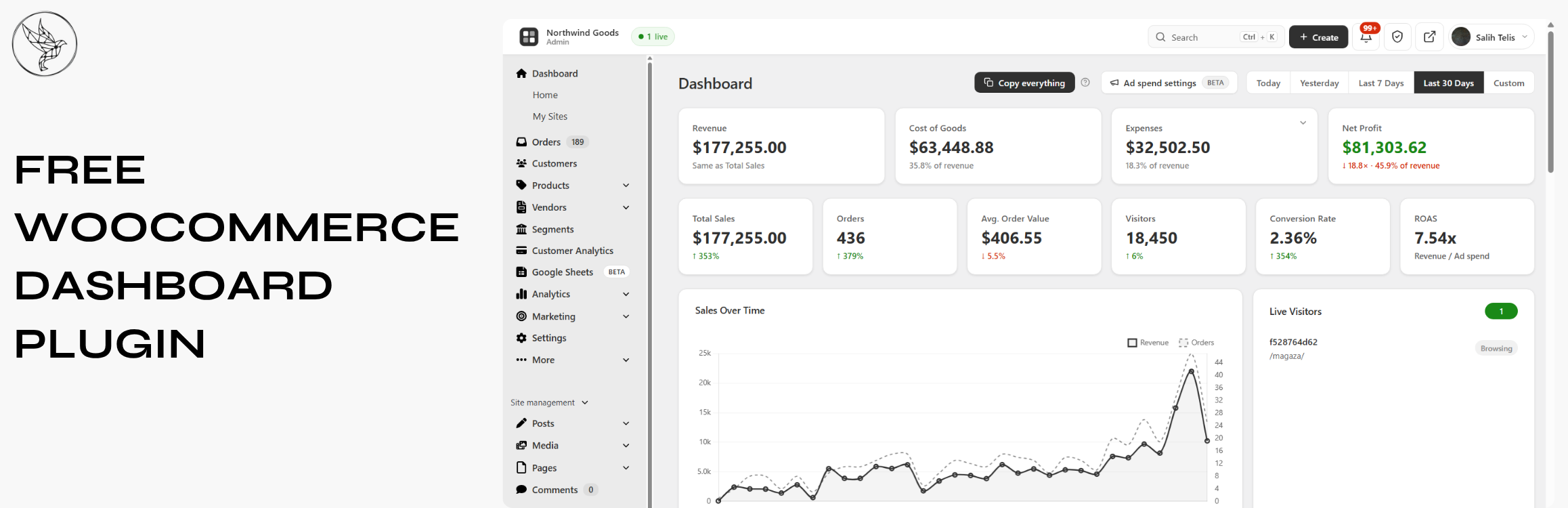
BrikPanel turns the default WooCommerce admin panel into a clean, fast, all-in-one cockpit: a modern WooCommerce dashboard, a real-time WooCommerce sales report, a powerful WooCommerce bulk editor, an inventory management workspace, an order management center, a coupon manager, a custom WP login page, and a real-time conversion tracking suite. Everything is free. Forever. No premium tier, no feature locks, no monthly subscriptions. A self-hosted Shopify alternative for WooCommerce: own your data, your products, and your customer list, with no monthly platform fee and no transaction fee.
Who is BrikPanel for?
- Store owners who want a modern WooCommerce dashboard with real numbers, not the slow built-in reports, and a self-hosted WooCommerce analytics solution instead of paying monthly fees to external SaaS tools
- Stores that want a lighter woocommerce inventory management workspace built into a complete admin redesign
- Anyone who needs to bulk edit WooCommerce products, including variations, without a premium plugin
- Agencies handing off stores to non-technical clients who need a simplified WooCommerce admin
- Shop owners migrating from Shopify who want a familiar, modern admin for their WooCommerce store, a free, self-hosted Shopify alternative
What you get (all free)
Modern WooCommerce Dashboard & Sales Report with Real-Time Analytics
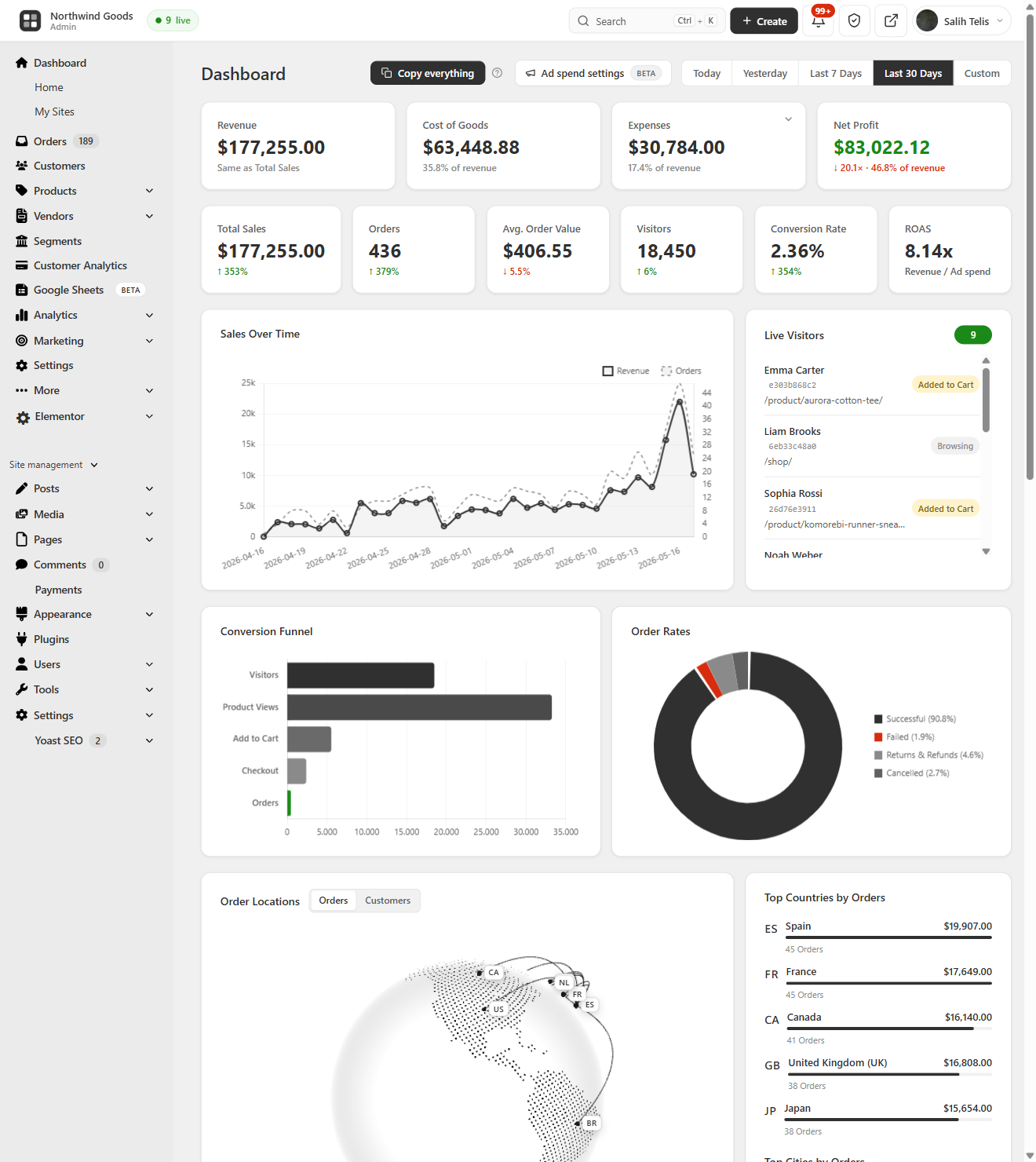
The heart of BrikPanel is a modern WooCommerce dashboard, a true woocommerce admin panel plugin, not a styling layer.
- Total Sales, Total Orders, Average Order Value (AOV): today, yesterday, last 7/30 days, or any custom range, with ±% period-over-period delta on every metric
- Visitors counted from your own database (admins excluded), and Conversion Rate computed live from real visitors and real orders
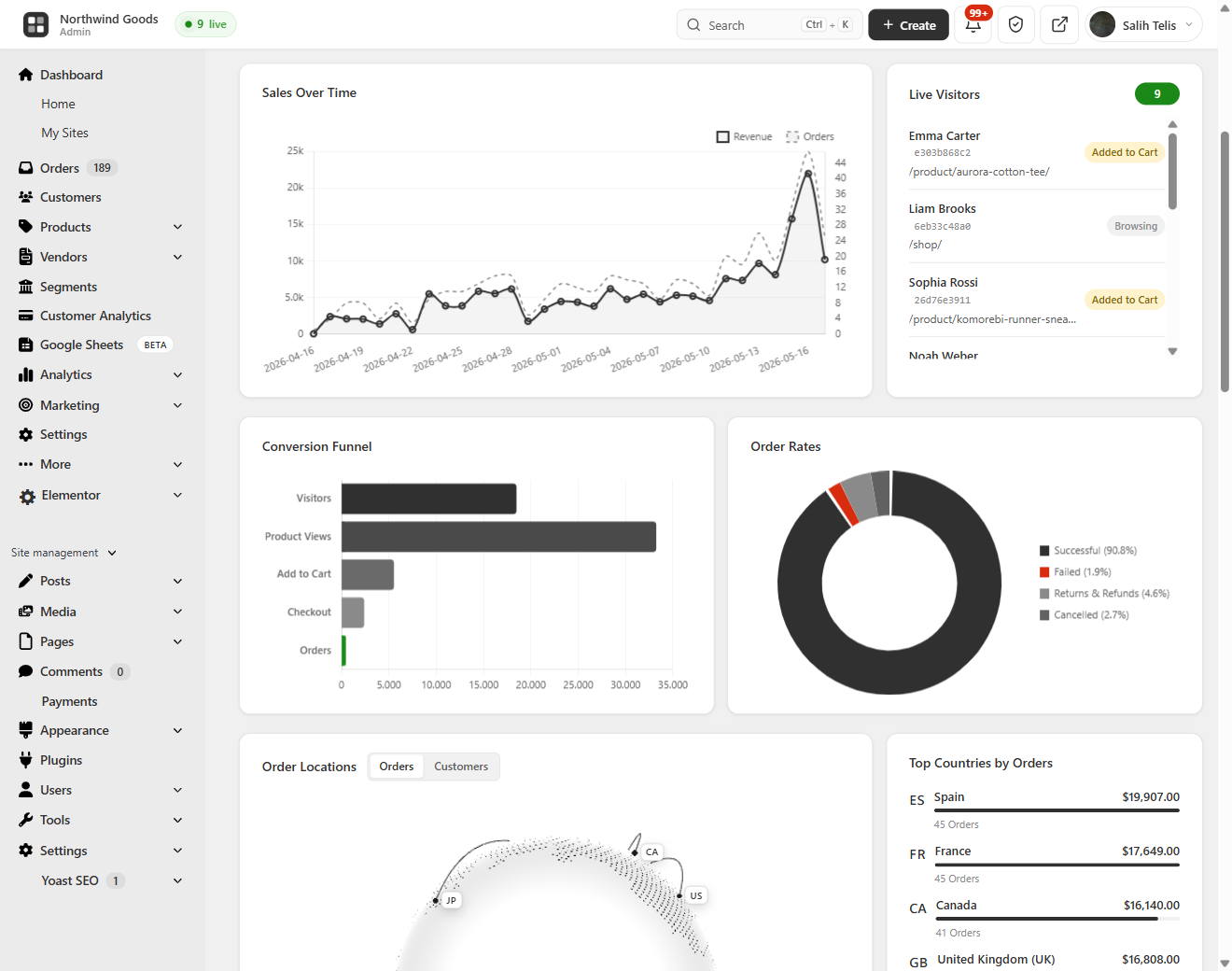
- Beautiful sales chart powered by Chart.js, plus an order status donut (Completed, Processing, Cancelled, Refunded, Failed)
- WooCommerce conversion funnel: Visitors Add to Cart Checkout Orders, with the conversion percentage at every step
This is a complete WooCommerce sales report and reporting layer: real-time sales reports, charts and KPIs inside a modern WooCommerce admin, with no external analytics service.
Customer Analytics: LTV, RFM Segmentation & Cohort Retention
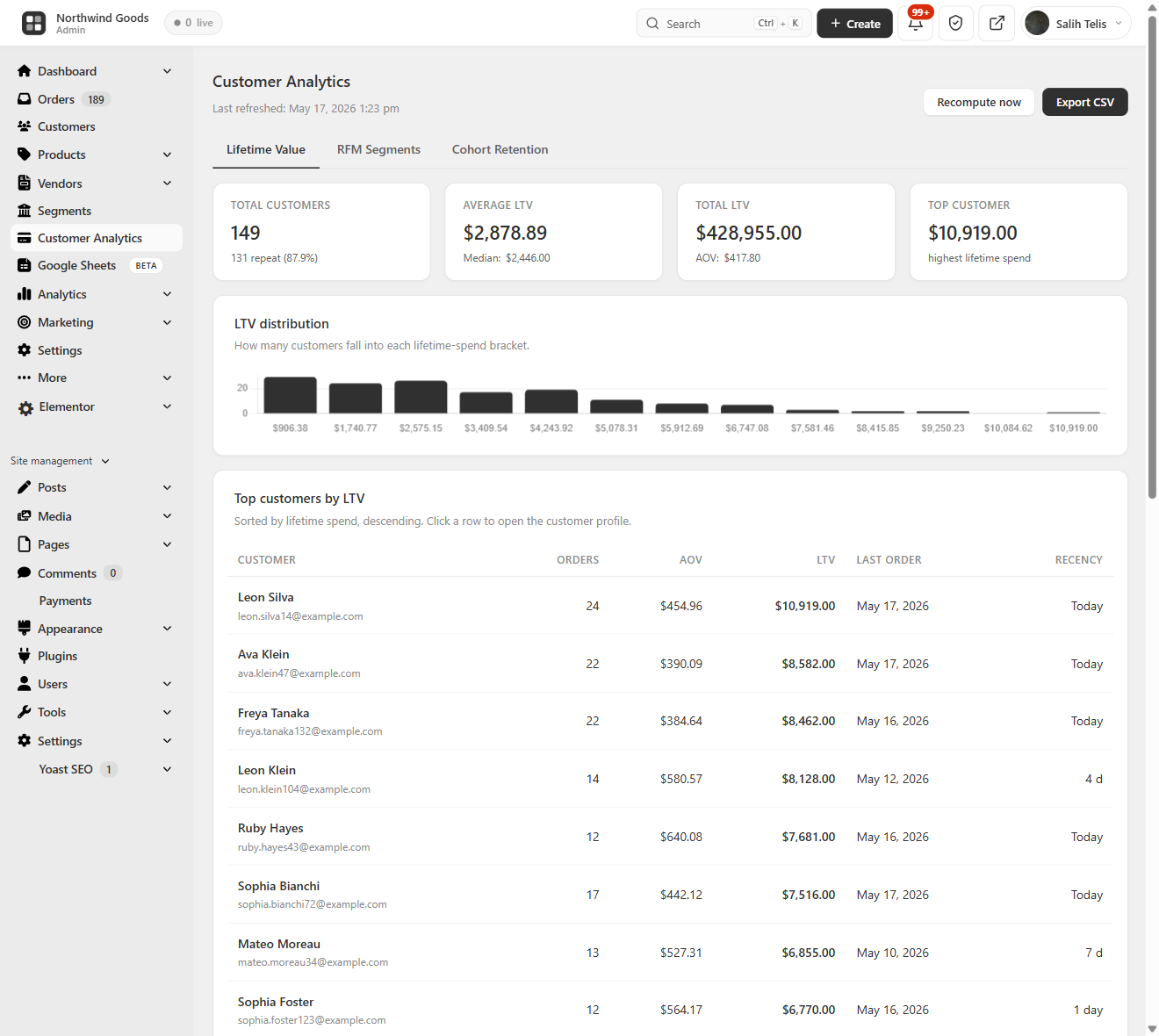
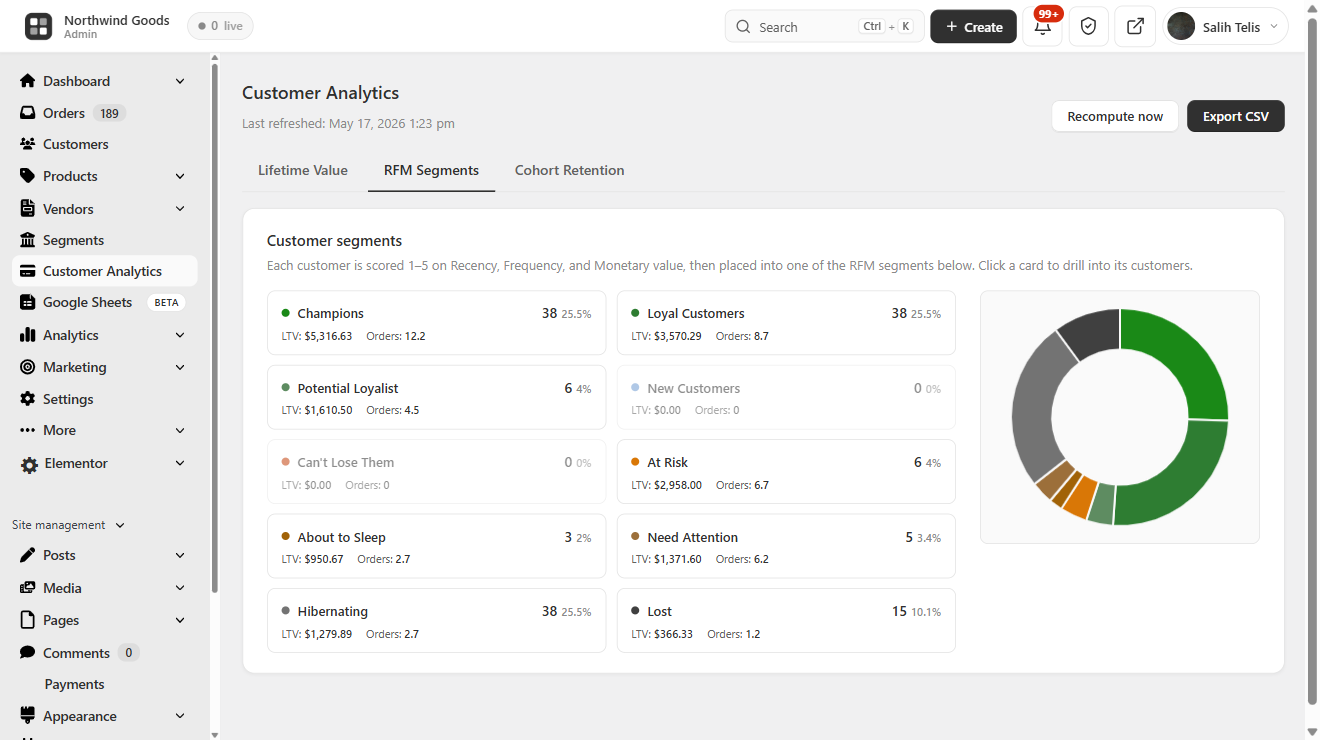
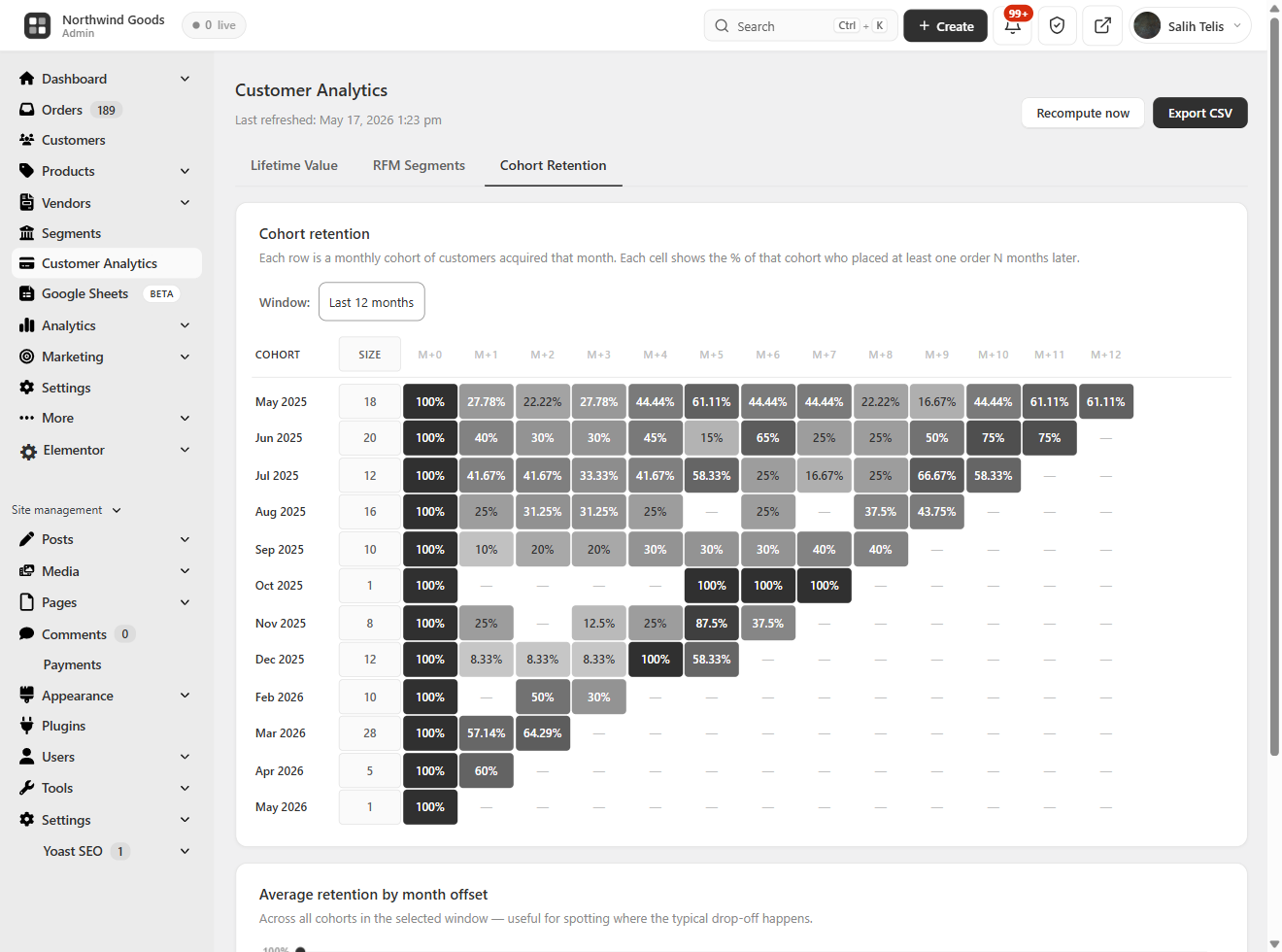
BrikPanel ships a complete WooCommerce customer analytics suite, calculated from your store data and visualized in the dashboard, no external service.
- Customer Lifetime Value (LTV): total customers, average and top LTV, full LTV distribution histogram, and a sortable top-customers table
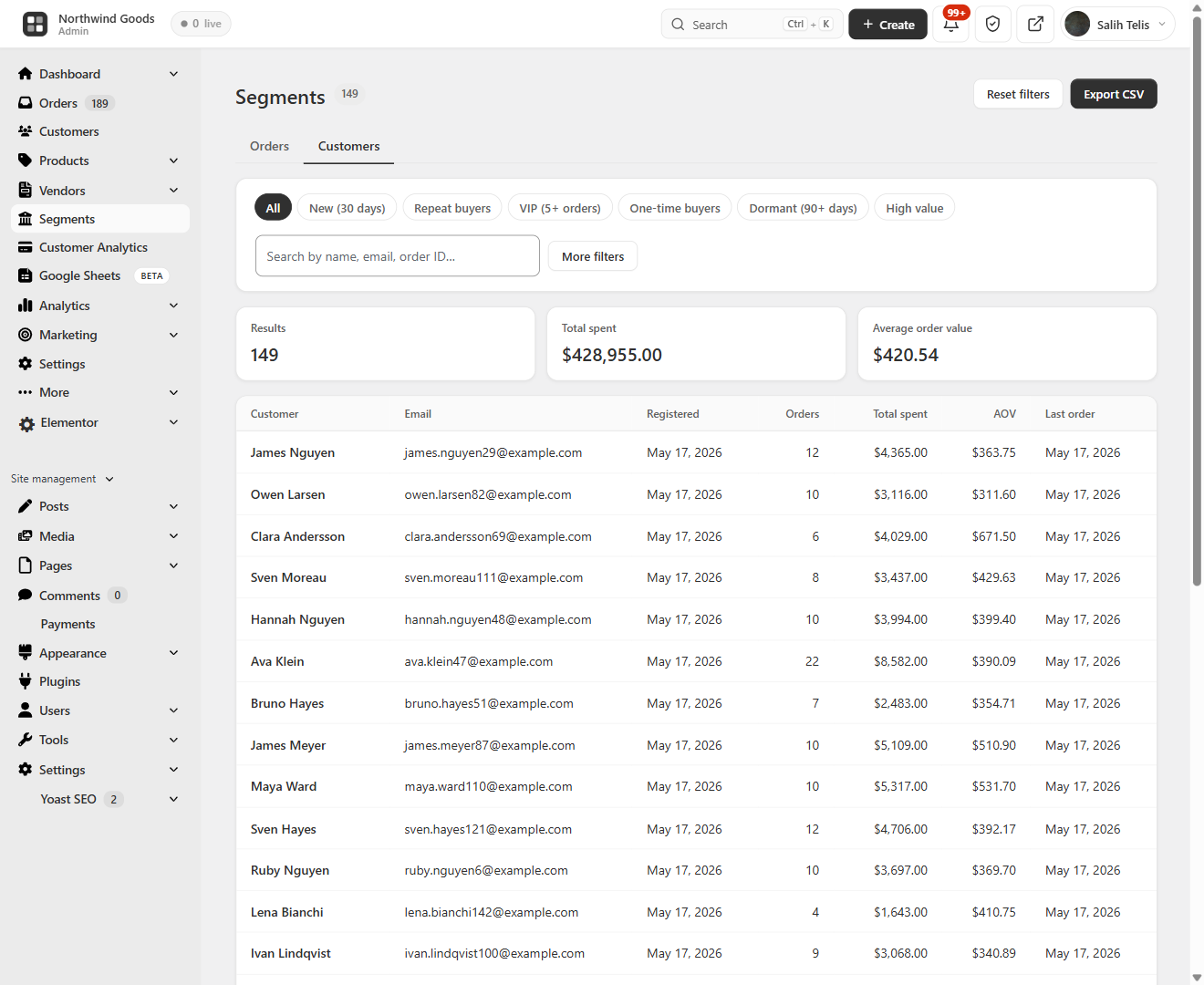
- RFM segmentation: every customer scored on Recency, Frequency, and Monetary, then bucketed into Champions, Loyal, At Risk, About to Sleep, Hibernating, and Lost, with revenue per segment
- Cohort retention: month-by-month cohort retention grid plus an average retention by month-offset trend line
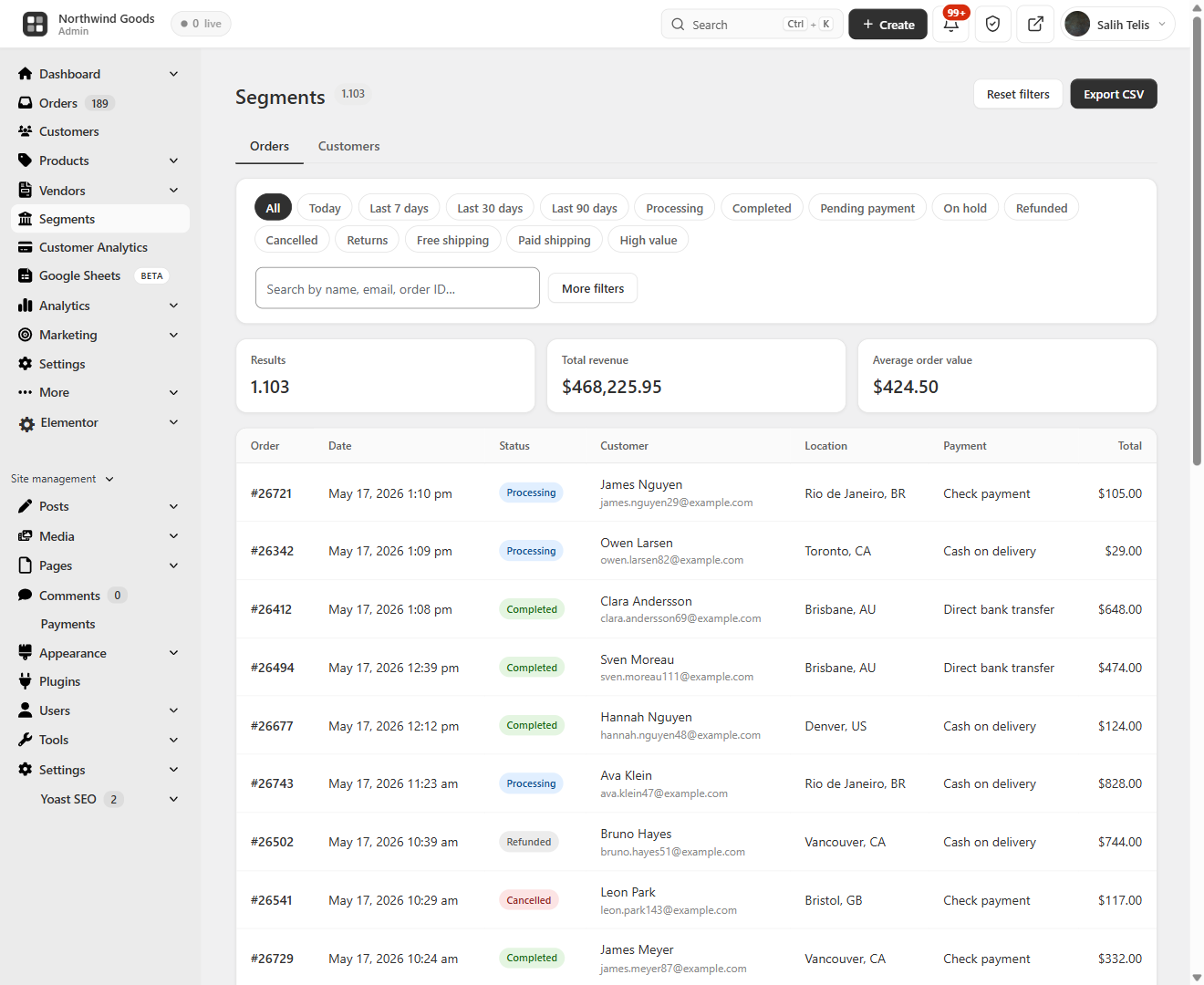
- Advanced filtering and segmentation: combine spend range, product, location, date and more to build saved segments for both customers and orders
Live Visitors & Real-Time Conversion Tracking
BrikPanel ships a built-in WooCommerce live visitors widget, see who is on your store right now, what page they are on, and whether they have items in the cart. Refreshes every 30 seconds by default (configurable). No external service, no Hotjar, no monthly fee.
- WooCommerce real time visitors widget with cart status (Browsing / Has items in cart / On thank-you page), current page, and customer info
- WooCommerce conversion tracking in the same database that powers the dashboard
- Visitor IPs are never stored, only a salted SHA-256 hash, and live visitor data stays in a short-lived cache, never in the database
- Privacy switches: turn front-end tracking off entirely, or keep it on while excluding logged-in customer details from the Live view
- Most-viewed pages and most added-to-cart products reports
A free woocommerce statistics plugin and woocommerce sales tracker without any external SaaS.
Geographic Analytics: WooCommerce Sales by Country
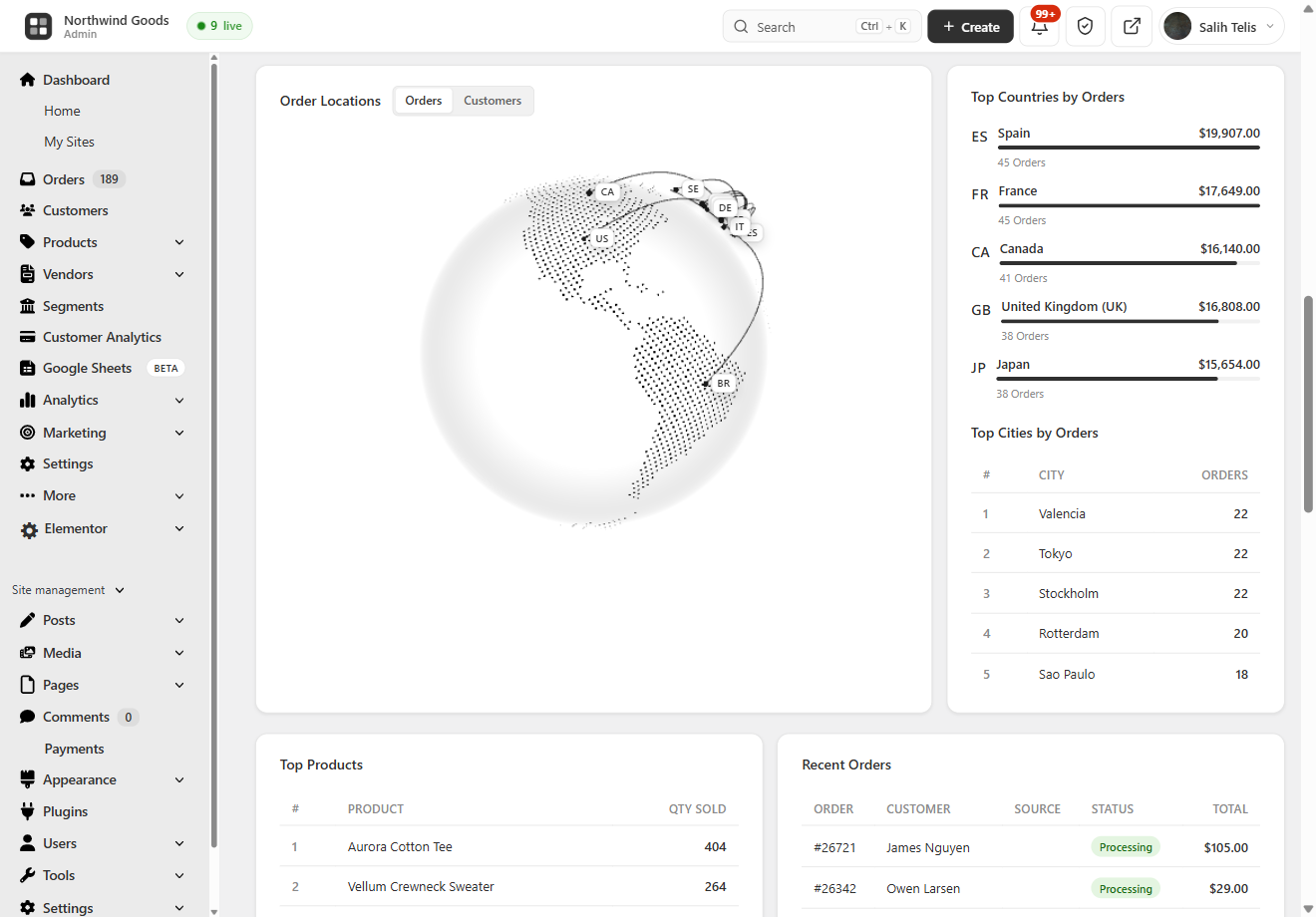
A 3D rotating globe (Cobe.js) plots every order on its real location, see WooCommerce sales by country and city without exporting a CSV, with Top 10 Countries and Top 10 Cities tables. Works with both HPOS and legacy order storage.
Lightning-Fast Order Search: Cmd/Ctrl + K from Anywhere
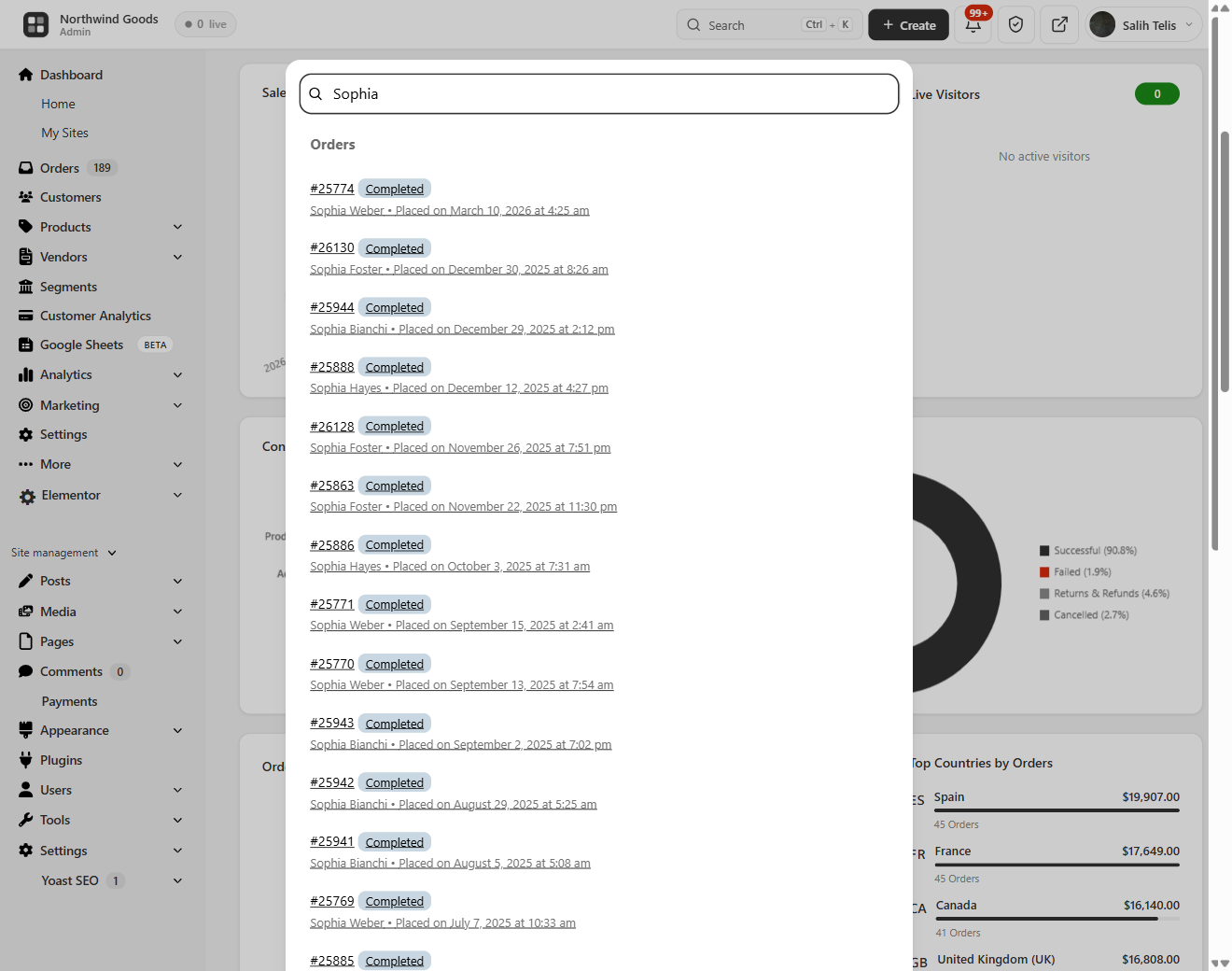
Hit Ctrl + K (or Cmd + K on Mac) anywhere in wp-admin and an order search overlay opens, the free woocommerce order search plugin. Searches order ID, customer name, email, phone and product SKU inside line items at once. True woocommerce quick search, with results as you type, status badges, totals and dates.
Modern WooCommerce Order Management
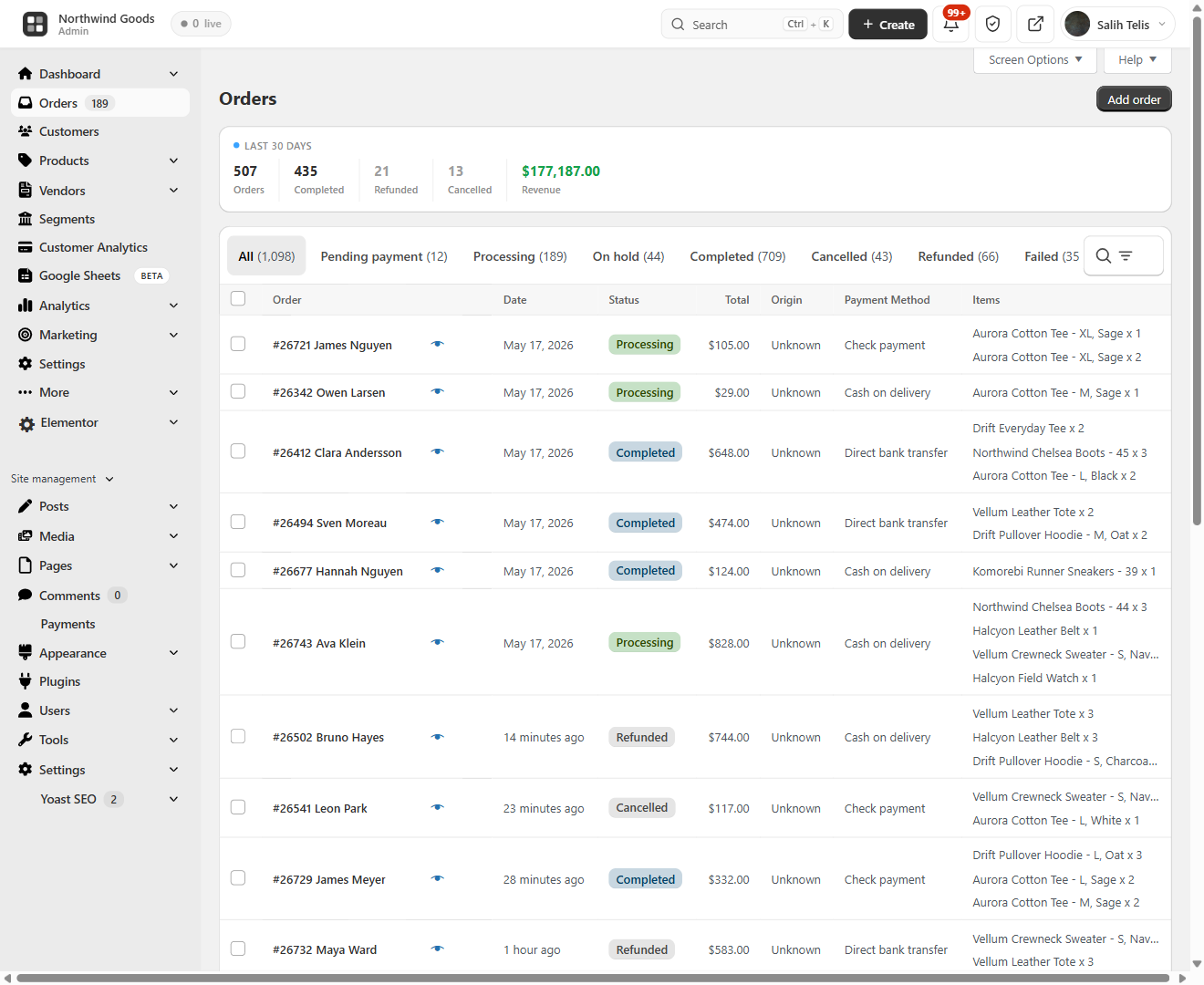
BrikPanel replaces the cluttered default orders page with a clean woocommerce order list plugin screen.
- 30-day overview bar: total orders, completed, refunded, cancelled, revenue
- Inline status change without opening the edit page
- HPOS (
wc_get_orders) and legacy storage (WP_Query) both supported - Two new statuses: Return Draft and Change
- Reskinned order edit page with copy-to-clipboard for billing/shipping
- Sold downloadable products column on the order edit page
- Optional BrikMarket marketplace stats integration
A real woocommerce order management plugin, not a reskin. Disable from settings anytime.
WooCommerce Product List Plugin: Built for People Who Actually Edit Products
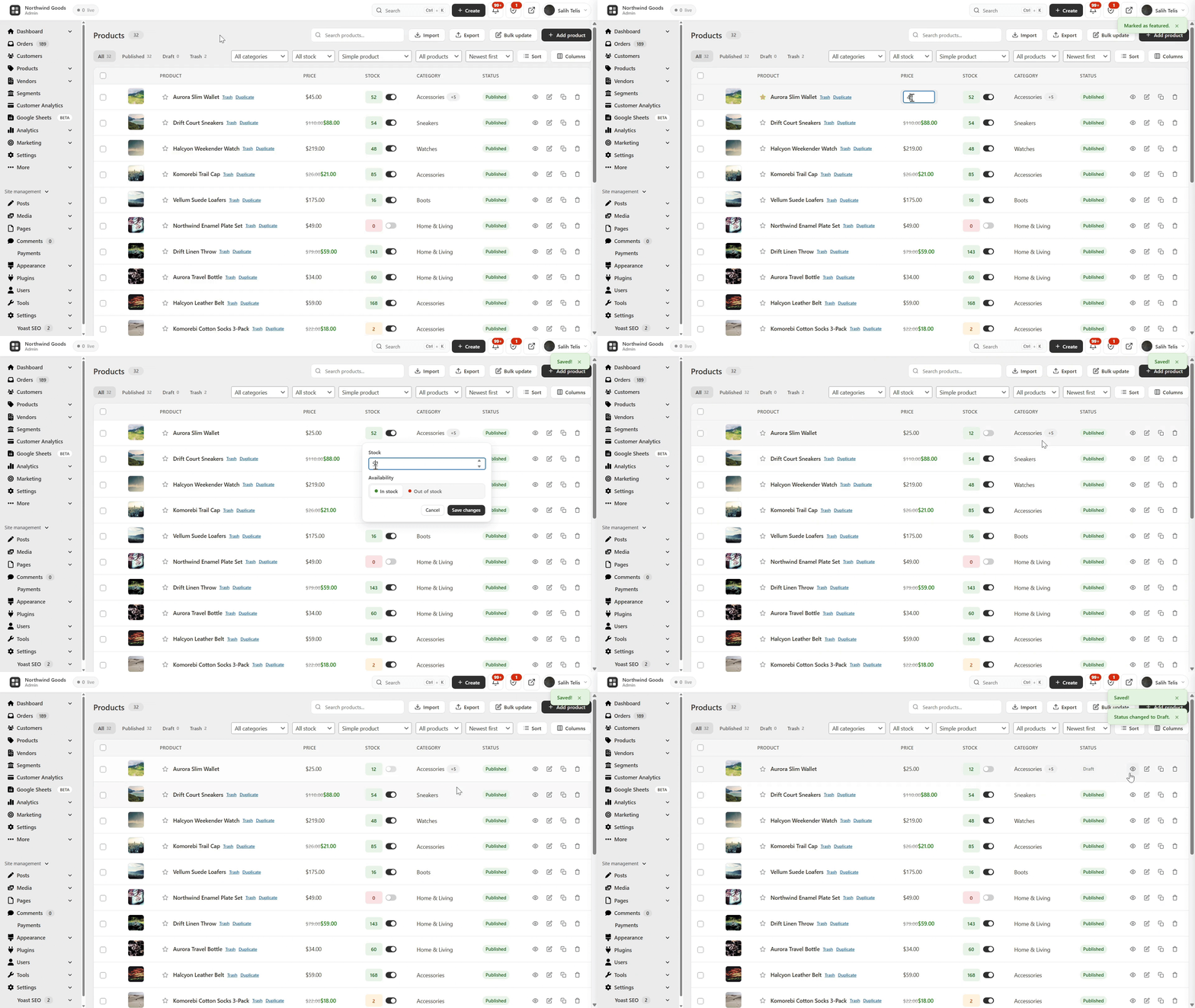
The default WooCommerce product list is fine for browsing, painful for editing. BrikPanel ships a complete woocommerce product list plugin that fixes it.
- Thumbnail, name, SKU, regular/sale price, stock badge, category
- Publish status toggle: flip draft published with one click, no reload
- Edit, Duplicate, Delete actions; bulk publish, draft, delete
- Status tabs (All / Published / Draft / Trash), live search by name or SKU
- Configurable per-page (5–100, default 20), AJAX pagination
- Per-user toggles for any third-party / SEO column added by Yoast, Rank Math, ASE and other plugins
- Admin and Site Enhancements (ASE) custom columns are respected in the BrikPanel product, order and customer lists
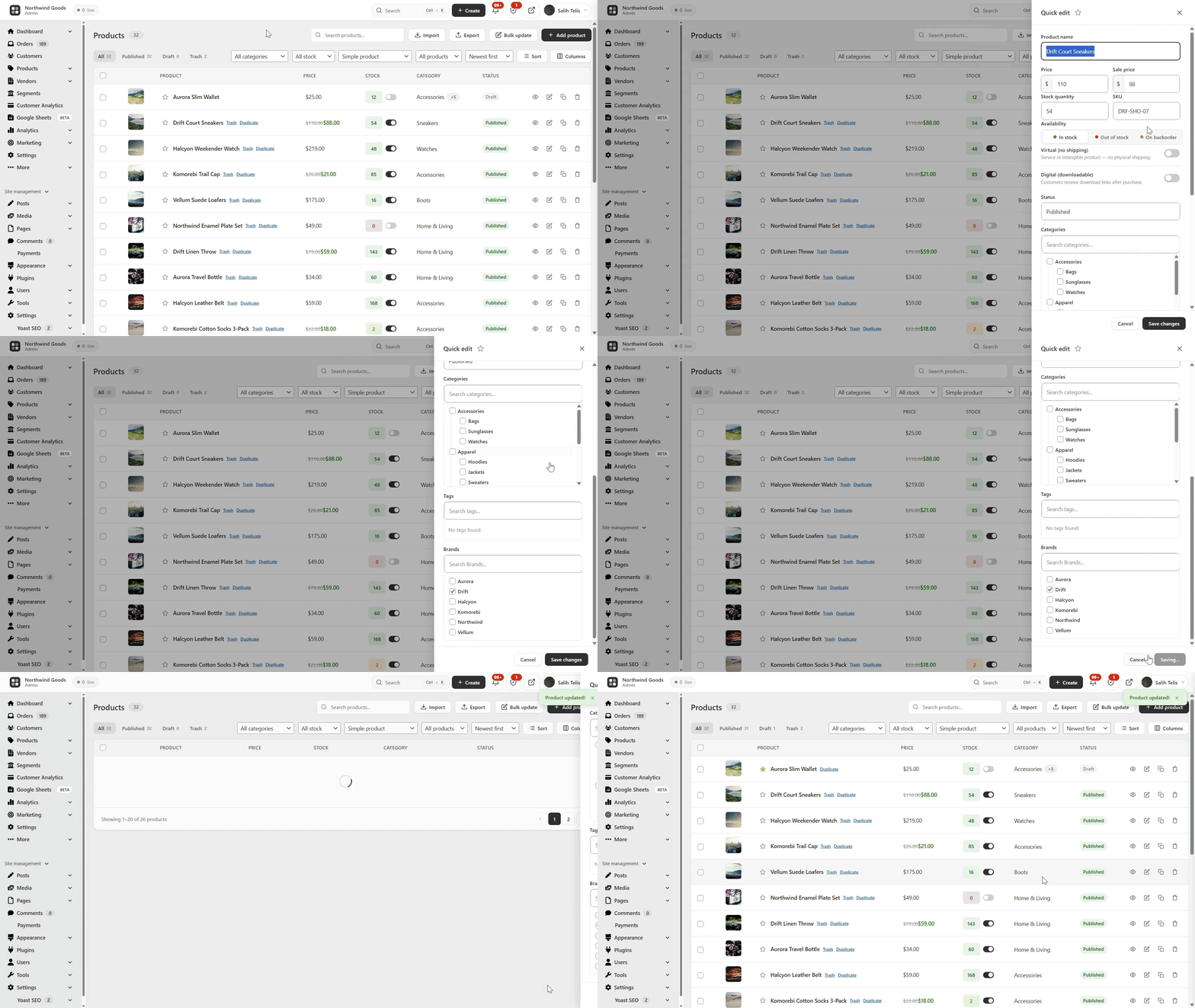
Quick Edit Sidebar: Edit Without Leaving the List
A slide-in panel from any product row to edit name, SKU, regular/sale price, stock and category, saved without leaving the list. The woocommerce quick edit WooCommerce should have shipped years ago: update woocommerce quick edit price, stock or category in two clicks.
Bulk Edit WooCommerce Products with the Variation Editor: Full Variation Support
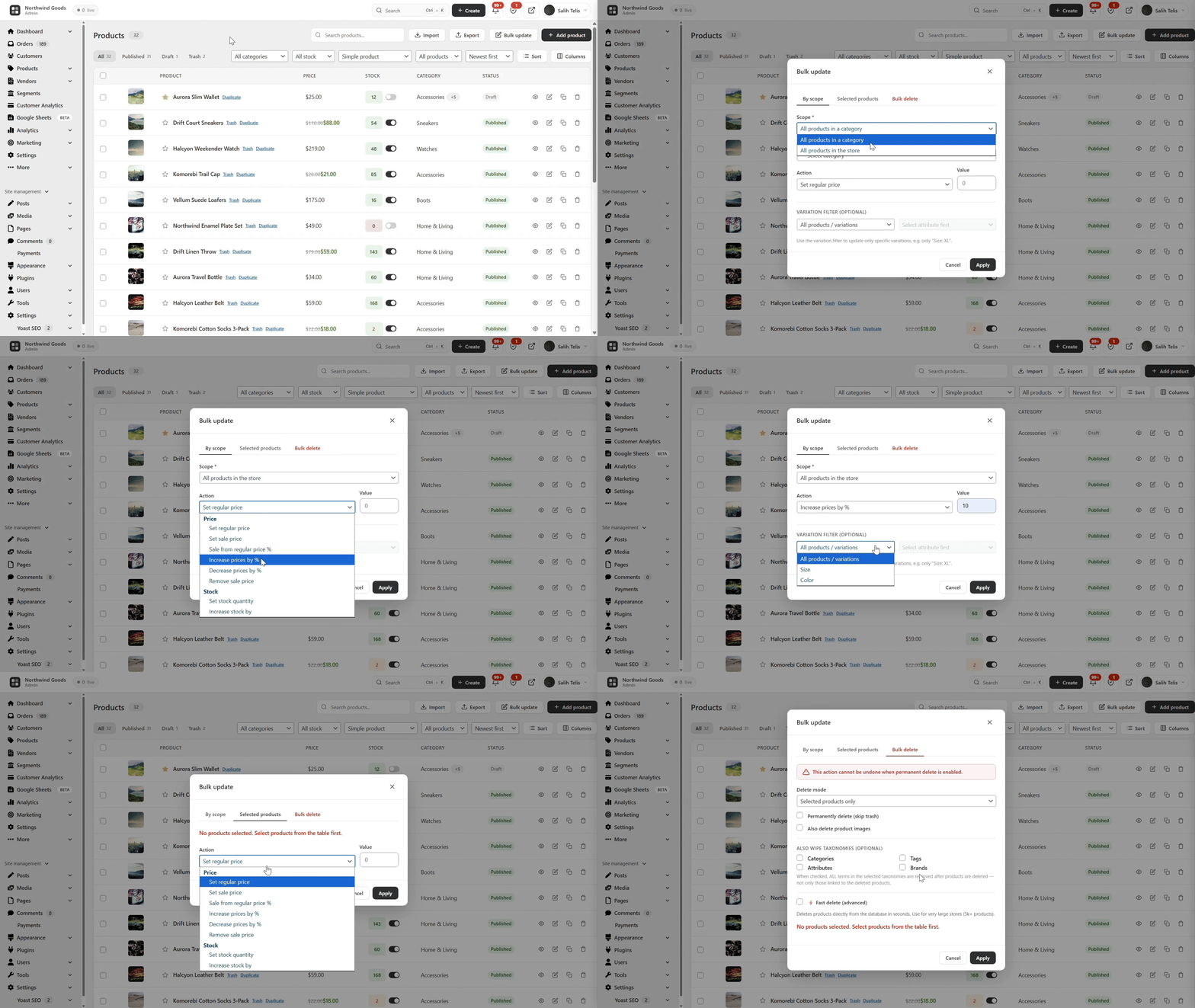
This is where BrikPanel pulls ahead of every other free woocommerce bulk editor. Most free plugins only handle simple products and only “increase price by X%”. BrikPanel does far more, on variable products too.
- WooCommerce bulk price update (regular and sale): percentage, fixed amount, or absolute value, across the whole catalog or filtered by category
- Bulk update WooCommerce products stock quantities (in/out of stock, set quantity, add/subtract)
- WooCommerce bulk price by category: pick a category, set a rule, every product updates
- WooCommerce bulk sale price updates with a date range
- Confirmation dialog on every bulk action
Now the part nobody else does for free: variation support.
- WooCommerce variation editor: open any variable product and edit every variation in one modal (regular price, sale price, stock, SKU)
- Bulk edit variation prices WooCommerce: set the same price for all variations of an attribute (every “Red” variation, every “L” size), or apply a percentage rule
- Bulk update variation stock: set or adjust the stock of every variation in one click
- Attribute filter to narrow visible variations when a product has 50+ combinations
How to bulk edit WooCommerce products including variations without buying a $79/year plugin? BrikPanel handles both simple and variable products for free.
Simplified WooCommerce Product Editor
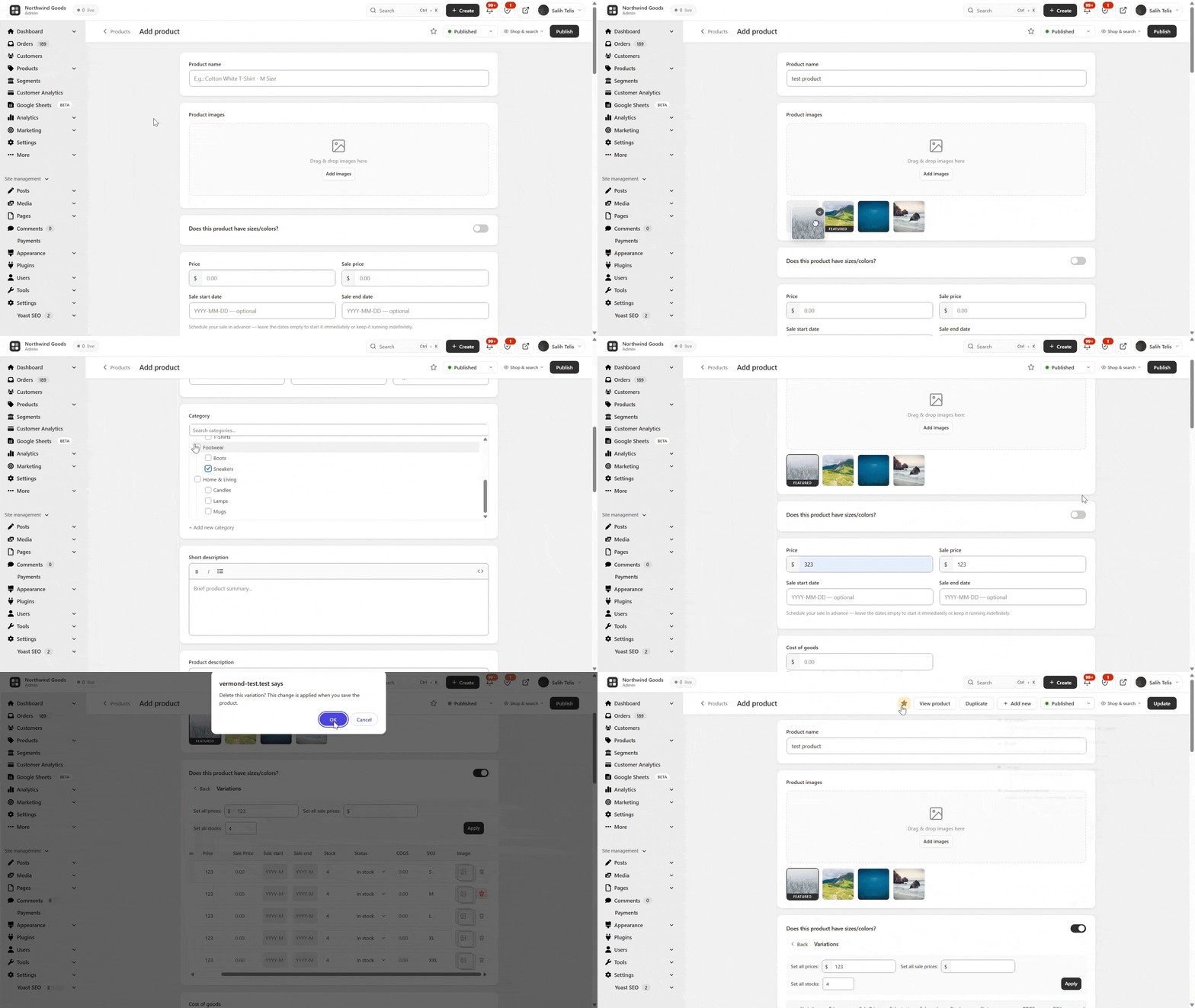
The default WooCommerce add-product screen has 11 metaboxes, 3 tabs and 40+ fields. BrikPanel ships a complete woocommerce product editor plugin with the noise removed.
- Featured image + product gallery with drag-and-drop upload, unlimited images, drag-to-reorder
- Regular price, sale price with decimal validation
- Searchable category picker with multi-select + quick create category without leaving the page
- Brand field: the WooCommerce
product_brandtaxonomy is now first-class alongside categories and tags - Short description + full rich-text description (wp_editor)
- SEO fields: custom slug, meta title, meta description, live Google SERP preview
- Full SEO plugin compatibility: Yoast SEO, Rank Math, All in One SEO and SEOPress metaboxes (including the SEO score panel) render and save inside the BrikPanel product editor
- Product type (Simple, Variable), attribute management with inline create
- Auto-generate variations from attribute combinations, per-variation price/sale/SKU/stock
- Duplicate any product in one click
Opt-in. Keep the default WooCommerce product page if you prefer.
WooCommerce Variation Gallery
Attach a separate image gallery to each product variation, the frontend swaps gallery automatically when a customer picks a variation. Image metadata (srcset, sizes, alt text) is fully preserved.
WooCommerce Categories Page: Drag-and-Drop Parent/Child Management
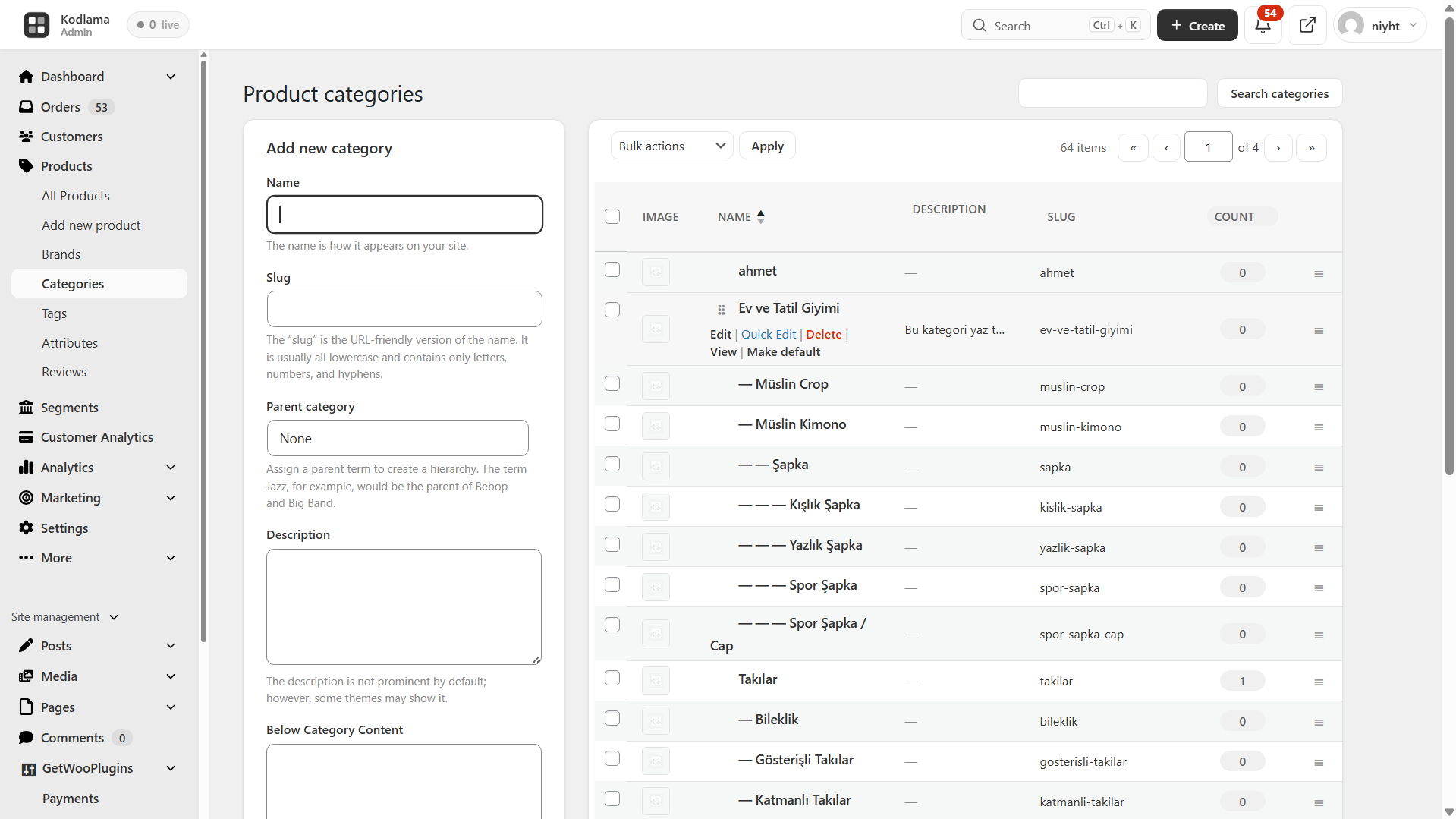
BrikPanel rebuilds the dated WooCommerce category screen with per-page settings (5–200) and drag-and-drop parent/child nesting with circular reference prevention, for both product_cat and product_tag.
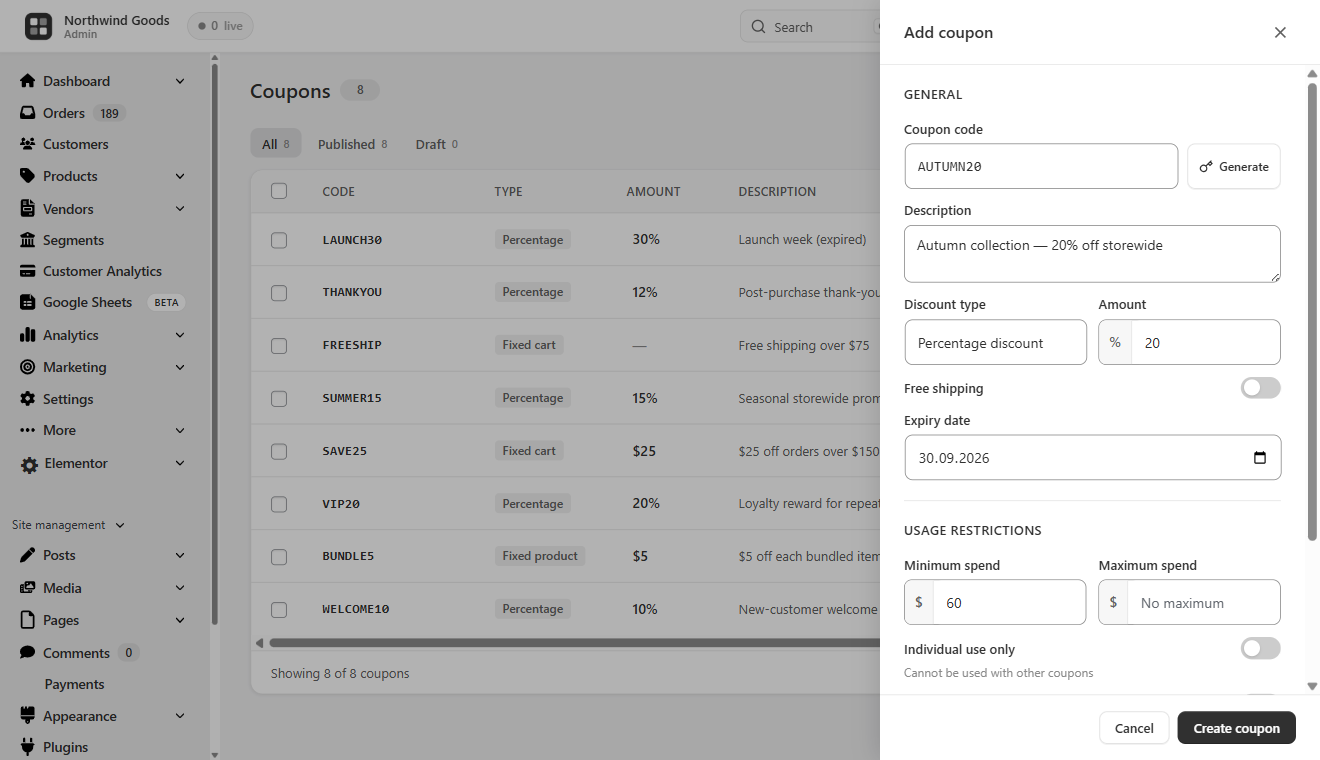
Best WooCommerce Coupon Plugin: Free Coupon Manager
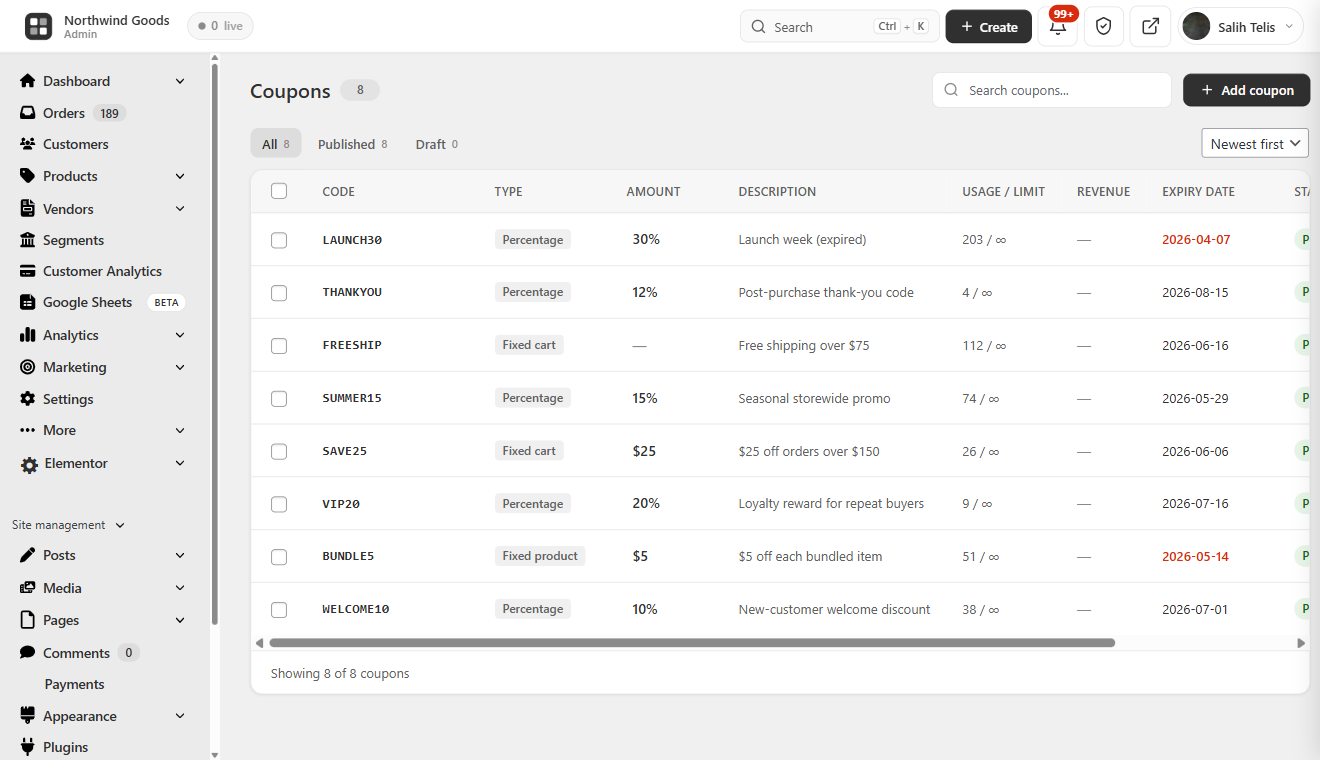
A complete WooCommerce coupon manager that makes coupons first-class in the admin, and we think the best WooCommerce coupon plugin in the free repository.
- Coupon table with code copy-to-clipboard, discount type icon, amount, usage count, expiry highlighting, and status
- Status tabs, AJAX pagination, slide-over coupon panel: create/edit without a reload
- Auto-generate random coupon codes; one-click duplicate
- Discount types: percentage, fixed cart, fixed product + free shipping toggle
- Expiry date picker, total + per-customer usage limits, min/max spend, individual use toggle, product/category include/exclude rules
WooCommerce Cart Abandonment & Cart Recovery
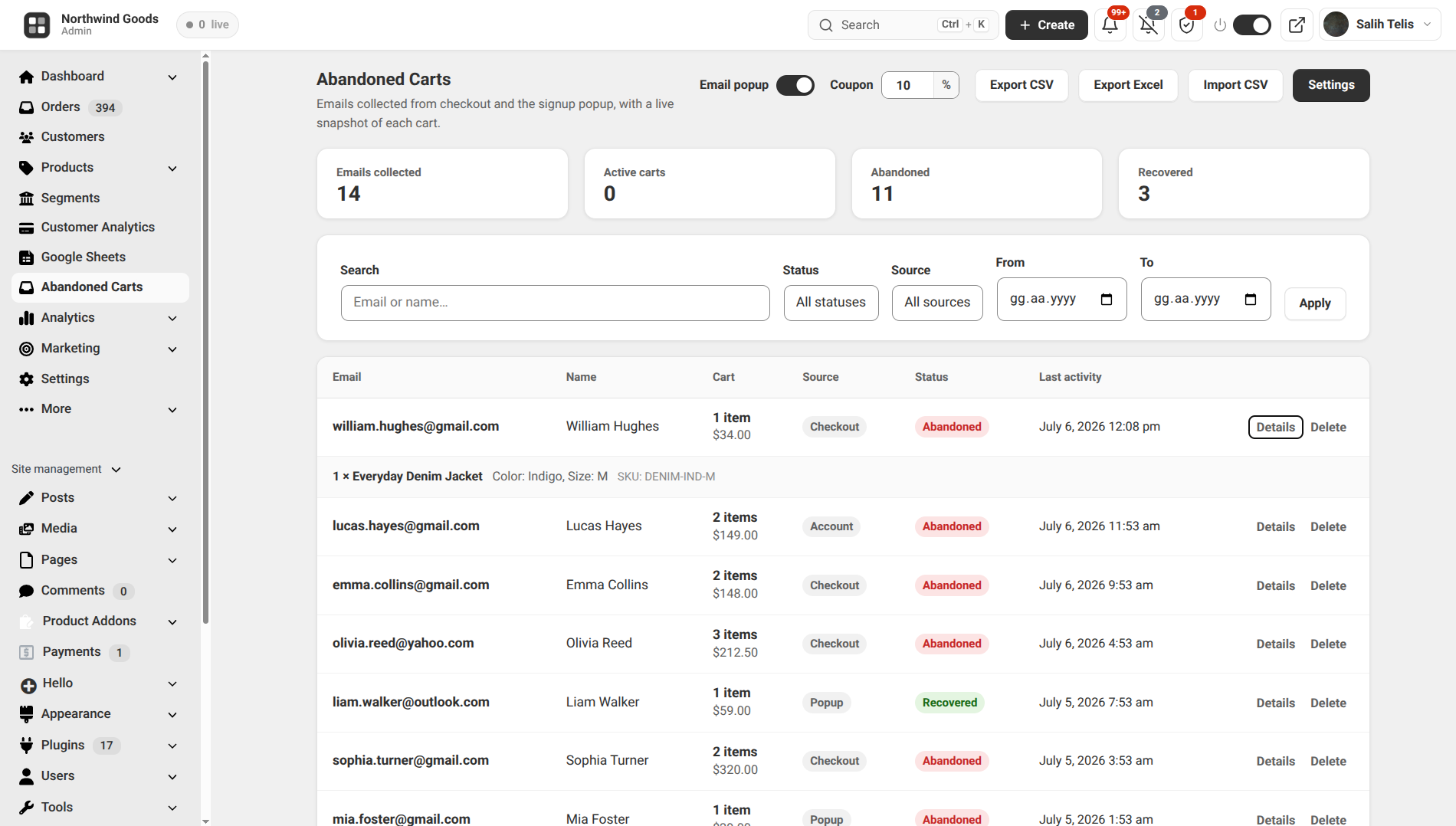
A built-in WooCommerce cart abandonment and cart recovery system, with no external email SaaS. A dedicated Abandoned Carts screen captures the checkout email of shoppers who do not finish (classic and block checkout, plus logged-in add-to-cart) and snapshots each cart down to the exact variation. Carts move Active to Abandoned to Recovered automatically, and an optional popup hands each subscriber a single-use cart recovery coupon. Search and date filters, CSV / Excel export and email-list import.
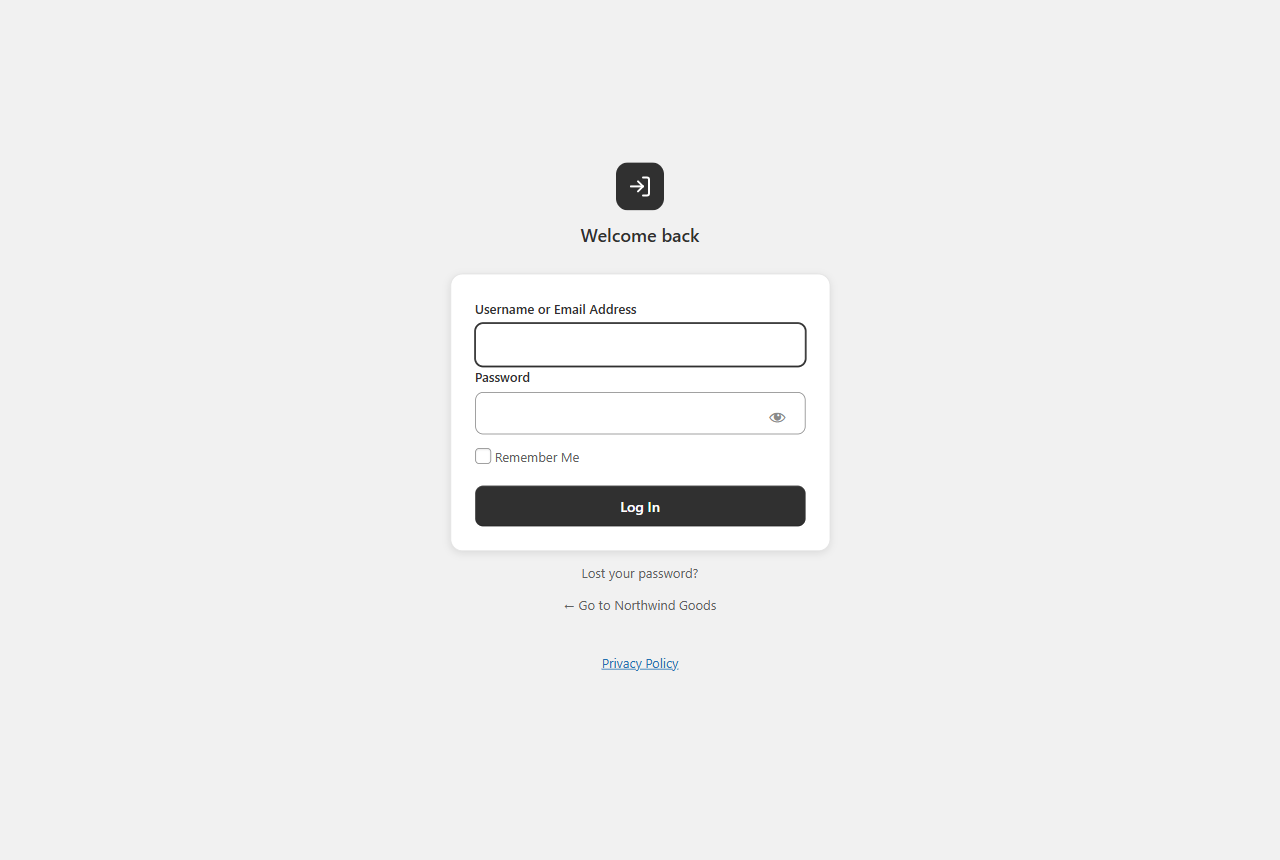
Custom WordPress Login Page: Custom WP Login Page for WooCommerce
A custom WP login page that fully replaces the default wp-login.php look, a real WordPress login customizer for WooCommerce stores.
- Centered card layout with your site name as logo
- Minimal, distraction-free fields, AJAX submission (no reload)
- Toast notification on errors, footer site branding
- Default WordPress login styles fully hidden
WooCommerce Inventory Management
A complete woocommerce inventory management workspace: the product list, bulk editor, variation editor and quick edit sidebar work together as one inventory workflow.
- Current stock for every product and variation in one place, with stock badges in the product list (in stock / low stock / out of stock)
- Update stock inline from the quick edit sidebar, or bulk update across categories and variations
- HPOS-enabled stores supported
A free woocommerce inventory management plugin that covers the daily workflow, no heavy stock control plugin needed.
Custom Top Admin Bar & Notifications
A Custom BrikPanel-styled top admin bar replaces the default WordPress toolbar with an e-commerce notification bell and quick links, toggleable from settings. Sound, confetti and a popup the moment a completed order arrives.
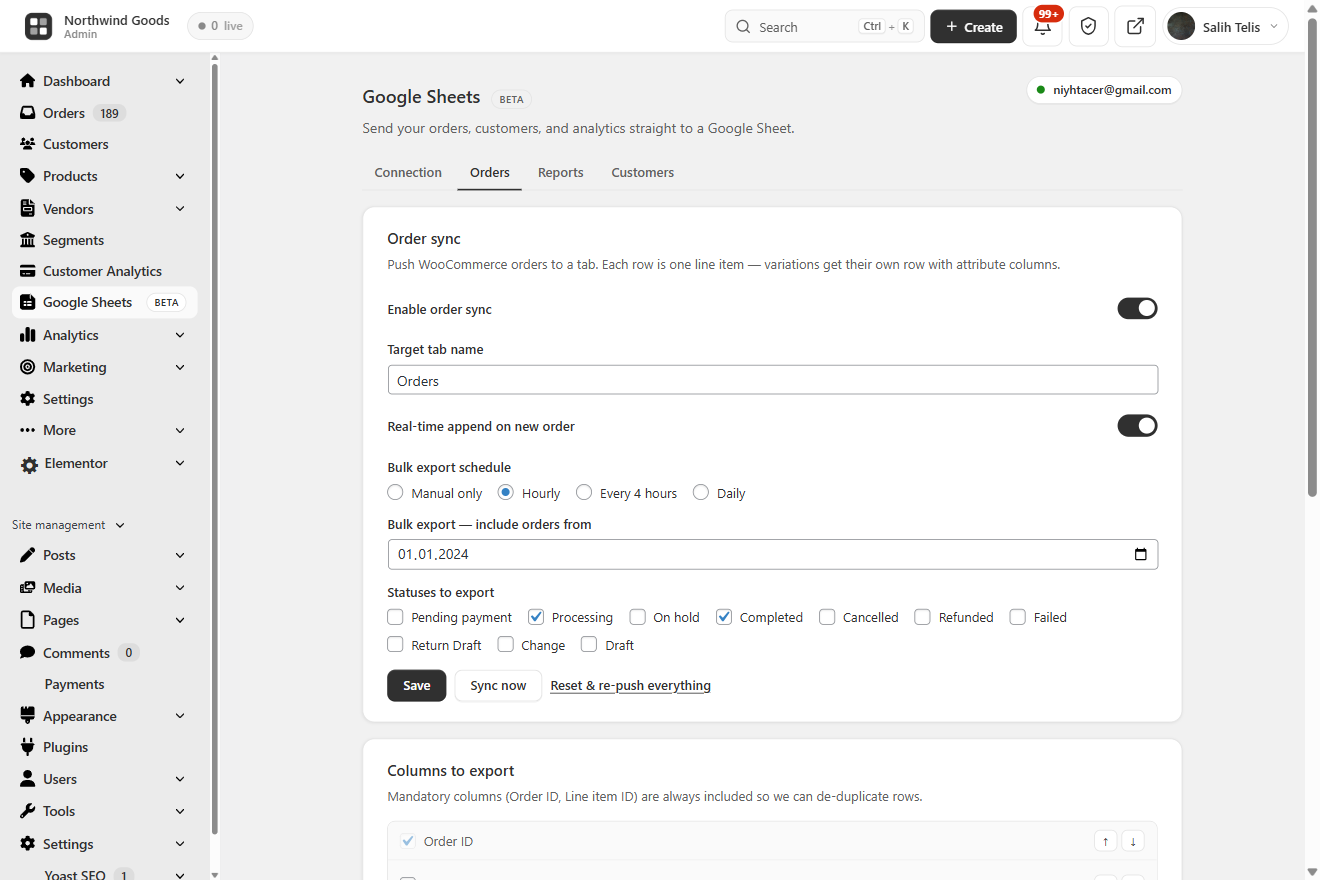
Google Sheets Sync: Real-Time WooCommerce Google Sheets Integration
BrikPanel ships a free WooCommerce Google Sheets sync, a fully native WooCommerce to Google Sheets integration that streams orders, customers and analytics into a Google Sheet you control. The free GSheetConnector alternative with no Zapier, no Make, no monthly fee.
- Real-time order sync: every new WooCommerce order is appended within seconds, one row per line item so variations get their own columns. Free woocommerce order sync to google sheets with no external automation tool
- Scheduled WooCommerce Google Sheets export: hourly, every 4h or daily catch-up; idempotent so re-runs never duplicate rows
- Analytics report snapshots: Sales Summary, Daily KPIs, Top Products and Funnel tabs refreshed on an interval for pivots and dashboards in Sheets
- Customer + RFM snapshot: chained to the nightly RFM recompute
HPOS-compatible: a real google sheets woocommerce sync, free.
WooCommerce ROAS, Net Profit & Ad Spend: Google Ads + Meta Ads
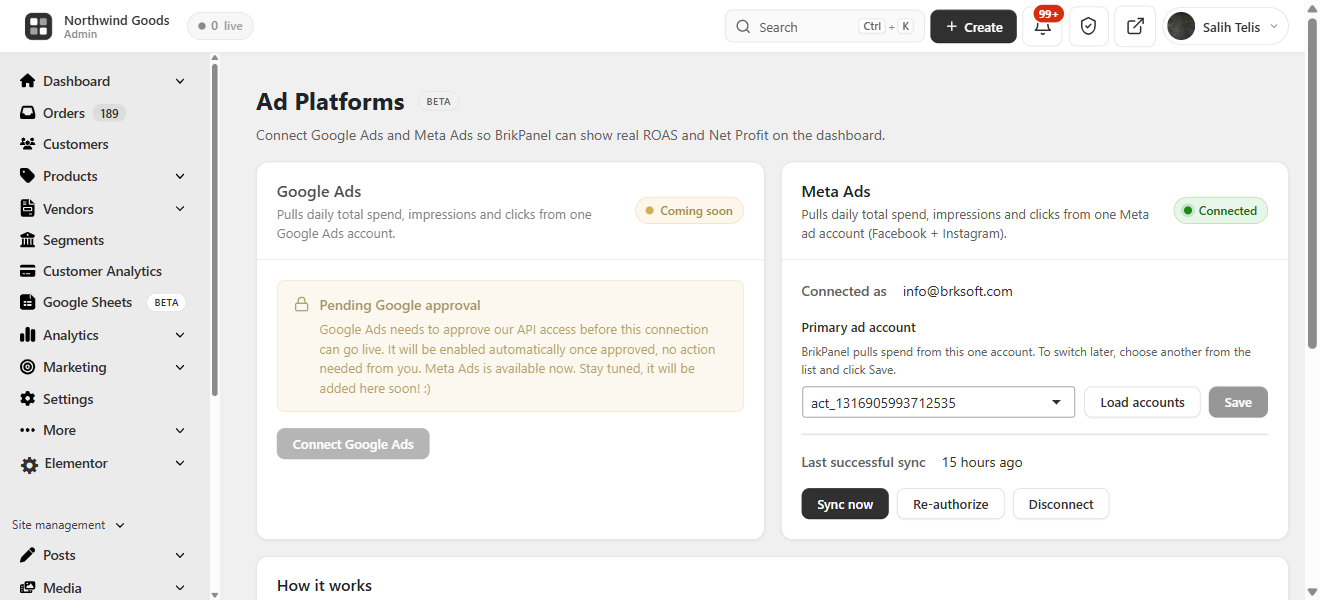
BrikPanel pulls daily spend from Google Ads and Meta Ads (Facebook / Instagram) so you see real WooCommerce ROAS, Net Profit and ad spend next to revenue. Multi-currency aware. A free Triple Whale alternative and woocommerce profit tracking dashboard with no monthly fee.
BrikMarket Marketplace Analytics
When BrikMarket is active, marketplace orders are excluded from the storefront conversion rate, and a dashboard block breaks down orders, share and top categories per marketplace.
Subscription & Membership Plugin Compatibility
Subscription products and member orders (WooCommerce Subscriptions, MemberPress, Paid Memberships Pro and more) show up in the same product list, order screens and customer analytics.
Developer Hooks & Filters
A developer hooks and filters system for agencies, actions and filters like brikpanel_after_product_save, plus a built-in docs popup in settings with one-click copy buttons.
Navigation & Admin UI Cleanup
- BrikPanel dashboard becomes the first WordPress admin menu item; admin bar gains quick links, footer rebranded
- Optional simplified mode hides the full WordPress menu, showing only BrikPanel + WooCommerce for non-technical clients
A Free, Self-Hosted WooCommerce Analytics & Inventory Suite
Store owners pay monthly SaaS fees for parts of what BrikPanel does free:
- Self-hosted WooCommerce analytics: sales, AOV, conversion, funnels, geo data, customer LTV, RFM, cohort retention, no third-party
- A free Metorik and Triple Whale alternative: analytics, ROAS and profit on your own server
- Shopify alternative for WooCommerce: the clean admin experience of Shopify with your storefront, customer data and orders on your own server
Why BrikPanel and not the default WooCommerce admin?
WooCommerce’s built-in analytics are slow, refresh hourly, and have no live visitor tracking, conversion funnel, geographic data, customer LTV / RFM / cohort reports, Cmd+K order search, quick edit sidebar, variation bulk editor, custom login or coupon manager. BrikPanel fixes every one of those gaps inside a single free WooCommerce admin plugin.
WooCommerce HPOS Compatibility & Performance
- Zero impact on storefront speed: only loads inside wp-admin
- Hardened performance for low-resource hosting: heavy queries are batched, cached and run through Action Scheduler so the dashboard, customer analytics and bulk editor stay responsive on shared hosting
- HPOS (High-Performance Order Storage) fully supported with dual code paths
- WooCommerce 7.x, 8.x, and newer; works alongside Admin Menu Editor, Slider Revolution, Yoast SEO, RankMath, WPML, Polylang
- Translation-ready (
.potfile included), with all JavaScript / jQuery strings routed throughwp_localize_script - All AJAX actions verify nonces and
manage_woocommercecapability; DB writes use prepared statements; visitor IPs stored only as truncated salted SHA-256 hashes; admin activity excluded from analytics; front-end tracking can be disabled entirely from settings
Screenshots
Installation
- Upload the plugin files to
/wp-content/plugins/brikpanel, or install via Plugins Add New Upload Plugin. - Activate through the Plugins menu.
- Open BrikPanel in the admin sidebar, the dashboard loads immediately.
- (Optional) Visit WooCommerce Settings BrikPanel to enable or disable specific modules.
That is it. No license key, no email signup, no external account.
FAQ
-
Is BrikPanel really 100% free?
-
Yes. Every feature on this page is in the free version. There is no premium tier, no feature lock, no trial period, no upsell. We built this because we needed it for our own 1000+ WooCommerce stores and decided to release it.
-
Is BrikPanel a self-hosted WooCommerce analytics solution?
-
Yes. BrikPanel gives you a complete WooCommerce analytics suite that runs entirely on your own server with no external dependencies. Sales analytics, product reports, conversion tracking, customer LTV, RFM segmentation, cohort retention and customer data are all included, nothing is sent to any third-party SaaS.
-
Does BrikPanel include a WooCommerce sales report?
-
Yes. The BrikPanel dashboard ships a complete WooCommerce sales report out of the box, total sales, total orders, average order value (AOV), refunds, and net revenue, each with a ±% period-over-period delta. Filter the sales report by today, yesterday, last 7 days, last 30 days, or any custom date range. The sales chart is rendered with Chart.js and pairs with the order status donut and conversion funnel for a full sales report you can read at a glance, without ever leaving wp-admin and without paying for an external analytics service.
-
Does BrikPanel offer custom WooCommerce reports, KPIs and a profit report?
-
Yes. The dashboard goes far beyond the built-in screens with a complete set of WooCommerce reports and WooCommerce sales analytics computed live from your own store data: sales, orders, AOV, conversion rate, customer LTV, RFM segments and cohort retention. Every headline metric is shown as a WooCommerce KPI card with a period-over-period delta, and a real profit report (revenue minus COGS, ad spend and manual expenses) sits right next to revenue. Because the LTV, RFM, cohort and geographic views are not part of core, BrikPanel effectively ships advanced reports for WooCommerce and custom WooCommerce reports as a free, self-hosted WooCommerce reporting layer, with no external SaaS and nothing sent off your server.
-
Can I customize the dashboard widgets, sales charts and graphs?
-
Yes. The BrikPanel admin dashboard is built from modular dashboard widgets (sales, orders, AOV, the conversion funnel, live visitors, the geographic globe, customer analytics and more), and the modules you do not need can be turned off from WooCommerce Settings BrikPanel. The sales charts and sales graphs are rendered with Chart.js and redraw for any date range you pick, so your custom dashboard shows exactly the sales charts, KPIs and reports you care about and nothing you do not.
-
Does BrikPanel work with multi-currency stores (CURCY, WCML)?
-
Yes. When your store takes orders in more than one currency, BrikPanel converts every order to your store’s base currency before summing, so Revenue, AOV and the sales chart are never a meaningless mix of currencies. With CURCY (WooCommerce Multi Currency) the exact day-of-sale rate is read from the snapshot CURCY stores on each order. With WCML (WooCommerce Multilingual & Multicurrency) the current WCML rate is applied and snapshotted onto the order the moment it is placed, which captures the day-of-sale rate for every order going forward. For any other multi-currency setup you can enter flat fallback rates under WooCommerce Settings BrikPanel Currency, or supply a rate programmatically through the
brikpanel_order_base_factorfilter (parameters: current factor,WC_Order, order currency, base currency — return the multiplier that converts one unit of the order currency into the base currency). -
Where does BrikPanel read Cost of Goods (COGS) from? Can I use my own cost field?
-
BrikPanel reads product cost from WooCommerce’s own native Cost of Goods Sold field (
_cogs_total_value, WooCommerce 9.5+) — the same field the WooCommerce product screen edits — so any plugin or import pipeline that writes the native cost is picked up automatically, including direct database writes. Costs saved by older BrikPanel versions are migrated into the native field automatically. Variation costs follow WooCommerce’s semantics, including the “additive” flag that adds a variation’s cost on top of the parent’s. If you keep cost somewhere else entirely, hook thebrikpanel_product_cogsfilter (parameters: resolved cost or null, product id, variation id) to point BrikPanel’s per-product cost reads at your own source. -
Can I turn off BrikPanel’s front-end visitor tracking?
-
Yes. If you already run a dedicated analytics tool, disable Visitor tracking under WooCommerce Settings BrikPanel Analytics and BrikPanel adds zero scripts and zero requests to your storefront. You can also keep tracking on but raise the live-visitor refresh interval to reduce server load, or exclude logged-in customer details from the Live view for a fully anonymous setup.
-
Does BrikPanel support WordPress multisite?
-
Yes, both ways: network-activate it to run on every store in the network, or activate it on individual subsites only. Each site gets its own tables and settings either way. When network-activated, super admins additionally get network-wide access rules under Network Admin Settings BrikPanel Access.
-
Does BrikPanel show customer LTV, RFM segments and cohort retention?
-
Yes. BrikPanel ships a full WooCommerce customer analytics suite directly in the dashboard. Customer Lifetime Value (LTV) is calculated for every customer with average, top, and full distribution histogram. RFM segmentation scores every customer on Recency, Frequency and Monetary and groups them into Champions, Loyal, At Risk, About to Sleep, Hibernating and Lost. Cohort retention shows a month-by-month grid plus an average retention trend line. All three are computed from your own store data, no external service involved.
-
Is BrikPanel a free Shopify alternative for WooCommerce?
-
Yes, for store owners who want to stay self-hosted. BrikPanel gives your WooCommerce store the clean, modern admin experience of Shopify: product list with inline editing, bulk price and stock updates, live visitors, conversion tracking, geographic analytics, customer LTV / RFM / cohort reports, a branded login page, but your storefront, your customer data, and your orders stay on your own server. No monthly platform fee, no transaction fee, no vendor lock-in. If you were evaluating Shopify but want to own your stack, this is the Shopify alternative for WooCommerce we built for that exact use case.
-
Is BrikPanel an ATUM alternative for inventory management?
-
For most stores, yes. BrikPanel includes complete woocommerce inventory management: stock levels, low stock badges, bulk stock updates, variation stock updates, all integrated into the same dashboard you use for sales and orders. If you only need daily stock work without advanced supplier or purchase order features, BrikPanel is a much lighter ATUM alternative.
-
How do I get a faster WooCommerce product list with bulk actions and quick edit?
-
The default WooCommerce product list is built for browsing, searching, sorting and editing it is slow. BrikPanel ships a complete woocommerce product list plugin with thumbnail, SKU, regular and sale price, stock badge, category, AJAX pagination, live search, status tabs, one-click publish toggle and a slide-in quick edit panel for every row. Works on both simple and variable products, and the same woocommerce product list screen powers the bulk price and bulk stock updates so you never leave the page to edit your catalog.
-
How do I bulk edit WooCommerce products including variations?
-
Open BrikPanel Products and click the Bulk Update button in the toolbar. You can update prices, sale prices, and stock for all products, by category, or for selected products. For variable products, open any product, click Edit Variations, and bulk update prices and stock across every variation in one modal. This is the part most free WooCommerce bulk editor plugins do not handle, BrikPanel does.
-
Can I bulk edit variation prices in WooCommerce with the free version?
-
Yes. Bulk edit variation prices WooCommerce is a core BrikPanel feature, and it is free. Set a percentage rule, set a fixed price, or update by attribute (every “Red” variation, every “Large” size). The same modal handles bulk update variation stock for the same products.
-
Does BrikPanel slow down my WooCommerce store?
-
No. BrikPanel only loads inside wp-admin. It has zero impact on your storefront speed, customer experience, page weight, or Core Web Vitals. The frontend never loads any BrikPanel code.
-
Is BrikPanel compatible with HPOS (High-Performance Order Storage)?
-
Yes. Every order query has dual code paths,
wc_get_orders()for HPOS,WP_Queryfor legacy. BrikPanel declares HPOS compatibility viaFeaturesUtil::declare_compatibility('custom_order_tables', ...)and is tested on stores running both modes. -
How do I see WooCommerce sales by country?
-
Open the BrikPanel dashboard. Scroll to the geographic analytics section. The 3D globe shows every order on its real geographic location, and the Top 10 Countries and Top 10 Cities tables update in real time. BrikPanel extracts country and city from the billing or shipping address of every order, so this works with no extra setup.
-
How do I customize the WordPress login page for my WooCommerce store?
-
BrikPanel includes a built-in wordpress login customizer. Enable the custom wp login page module from BrikPanel settings and the default
wp-login.phpis replaced with a clean, branded login form that matches the rest of the BrikPanel admin. No CSS knowledge required. -
How do I search WooCommerce orders by customer name or phone number?
-
Press
Ctrl + K(orCmd + Kon Mac) anywhere inside wp-admin. The BrikPanel quick search overlay opens and searches across order ID, customer name, email, phone, and product SKU at the same time. This is the woocommerce search orders experience the WooCommerce admin should ship with by default. -
Can I see who is on my WooCommerce store right now?
-
Yes. BrikPanel includes a woocommerce live visitors widget on the dashboard that updates every 30 seconds. You can see what page each visitor is on, whether they have items in the cart, and whether they are an existing customer. This is real woocommerce real time visitors tracking, not estimates.
-
Does BrikPanel track WooCommerce conversion rate and conversion funnel?
-
Yes. BrikPanel includes a complete woocommerce conversion tracking system that records visitors, add-to-cart events, checkout starts, and completed orders. The dashboard shows your woocommerce conversion funnel as a four-step visual: Visitors Add to Cart Checkout Orders, with the conversion percentage at every step.
-
Is there a free WooCommerce conversion tracking plugin built into BrikPanel?
-
Yes. BrikPanel ships a free WooCommerce conversion tracking plugin that records every visitor, add-to-cart, checkout start and completed order in your own database, no Google Analytics setup, no Hotjar, no monthly fee. The funnel and conversion-rate widgets on the dashboard are computed from this same dataset in real time.
-
Does BrikPanel recover abandoned carts?
-
Yes. BrikPanel includes a built-in WooCommerce cart abandonment and cart recovery system in the free version: no Klaviyo, Mailchimp or external email SaaS. It captures the email of shoppers who begin checkout but do not complete the order (from both the classic shortcode checkout and the newer block checkout, and from logged-in customers the moment they add to cart) and lists every one on a dedicated Abandoned Carts screen. Each entry keeps a full snapshot of the cart, including the exact variation, quantity and total, and moves through Active, Abandoned and Recovered automatically, even if the shopper later checks out with a different email. The screen has search, status, source and date filters, per-row product details, CSV and Excel export, statistics cards, and a CSV importer to bring in an existing email list. It works on both simple and variable products.
-
How does the WooCommerce cart recovery coupon popup work?
-
Switch on the optional email popup and BrikPanel shows a clean, on-brand sign-up offer to your visitors. Anyone who subscribes is issued their own single-use percentage cart recovery coupon (10% by default, and you set the rate), restricted to their email and valid for 30 days, shown right there with a one-click Copy button. You control the heading, message, button and success text, the delay before it appears, the cooldown after it is dismissed, and which of six animated reveal styles the coupon uses (Sealed envelope, Pocket card, Scratch card, Slot machine, Magnetic assembly or Classic ticket), all of which respect a visitor’s reduced-motion preference. Close the popup and it folds into a small floating tab, one click from reopening.
-
How do I sync WooCommerce orders to Google Sheets for free?
-
Open WooCommerce BrikPanel Google Sheets, click “Connect Google account”, pick or create a target spreadsheet, and toggle “Real-time order sync” on. Every new WooCommerce order is then appended to your Sheet within seconds, with one row per line item so variations land in their own columns. Status changes update the existing row in place. No Zapier, no Make, no monthly fee, a real woocommerce google sheets sync built into BrikPanel.
-
Does BrikPanel work as a free GSheetConnector or WPSyncSheets alternative?
-
Yes. BrikPanel includes a complete WooCommerce to Google Sheets integration in the free version: real-time order sync, scheduled bulk export, analytics snapshot tabs (Sales Summary, Daily KPIs, Top Products, Funnel) and a customer + RFM snapshot. All four flows ship free with no row limit, no premium tier, and OAuth-based authentication that requests minimum scopes only (
drive.file, never full Drive access). -
How do I see real ROAS and net profit in WooCommerce?
-
Connect Google Ads and/or Meta Ads from the BrikPanel Ad Platforms page. BrikPanel then pulls your daily ad spend and shows three new dashboard cards: Ad Spend (summed across every connected platform for the active date range), WooCommerce ROAS (store revenue ÷ ad spend), and Net Profit (revenue − COGS − ad spend − manual expenses). COGS comes from WooCommerce’s native order cost meta and expenses from the BrikPanel expenses table, so the woocommerce roas and net profit numbers are real, not estimates. The cards are multi-currency aware, if an ad account reports in a different currency than the store, spend is shown split and ROAS / Net Profit are omitted instead of printing a misleading converted number.
-
Is BrikPanel a free Triple Whale alternative for WooCommerce?
-
For self-hosted stores, yes. BrikPanel gives you the WooCommerce ROAS and net profit view store owners buy Triple Whale, TrueProfit or BeProfit for: daily Google Ads and Meta Ads spend pulled in next to store revenue, COGS and expenses, but it runs entirely on your own server with no monthly fee and no data sent to a third party. If you only need true ROAS and profit (not full multi-touch ad attribution), this is the free Triple Whale alternative built for that exact use case.
-
Does BrikPanel connect to Google Ads and Meta (Facebook / Instagram) Ads?
-
Yes. BrikPanel connects to both Google Ads and Meta Ads through a secure OAuth proxy (the plugin only ever stores encrypted tokens, never your password). It pulls daily spend per platform, backfills history, and re-syncs recent days automatically so the dashboard ROAS and net profit stay accurate. The integration is spend-and-profit focused, it does not install a Facebook pixel or do multi-touch attribution; it gives you true woocommerce roas and net profit without a paid SaaS.
-
Is there a free WooCommerce variation editor for bulk price and stock updates?
-
Yes. BrikPanel includes a complete WooCommerce variation editor in the free version. Open any variable product, click “Edit Variations”, and you can bulk update every variation’s price, sale price, stock and SKU in one modal, with attribute filtering when a product has 50+ combinations. The same woocommerce variation editor also supports per-attribute rules (“set every Red variation to $X”).
-
What makes BrikPanel different from the built-in WooCommerce analytics?
-
The built-in WooCommerce analytics are slow, refresh on a delay, only show historical data, and have no live visitor tracking, no conversion funnel, no geographic globe, no customer LTV / RFM / cohort reports, no Cmd+K order search, no quick edit sidebar, no variation bulk editor, no custom login page, and no coupon manager. BrikPanel adds every one of those features inside a single free plugin.
-
Is BrikPanel just a CSS reskin of the WooCommerce admin?
-
No. BrikPanel is a real woocommerce admin dashboard plugin with custom database tables for visitor tracking, custom AJAX endpoints for every interaction, real conversion analytics, a working bulk editor, a real product editor, a real coupon manager, and a real custom login system. Other plugins (Dashify, UiPress) only restyle the admin. BrikPanel rebuilds the parts of WooCommerce that needed to be rebuilt.
-
Can I use BrikPanel as a WordPress admin theme or admin skin for my store?
-
In practice, yes. BrikPanel is built specifically for WooCommerce, but for store owners it behaves like a focused WordPress admin theme: it reskins the WooCommerce parts of wp-admin into a clean, Shopify-style custom admin panel, replaces the default toolbar, and restyles the product, order, customer and coupon screens. If you have been looking for a wp admin theme or an admin skin that makes the WooCommerce admin genuinely pleasant to work in (rather than a generic restyle that breaks on the next WooCommerce update), this is built for exactly that. You can also hide admin menu items for non-technical clients with the optional simplified mode, leaving only BrikPanel and WooCommerce in the sidebar.
-
Does BrikPanel work with Yoast SEO, RankMath, Elementor, WPML, and Polylang?
-
Yes. BrikPanel does not interfere with frontend rendering, so it works with every page builder and SEO plugin we have tested. Yoast SEO, Rank Math, All in One SEO and SEOPress metaboxes (including their SEO score panels) render and save inside the BrikPanel product editor. It also has its own translation files and is fully compatible with WPML and Polylang for multilingual stores.
-
Does BrikPanel work with WooCommerce Subscriptions and membership plugins?
-
Yes. BrikPanel is compatible with WooCommerce Subscriptions, Subscriptions for WooCommerce (WP Swings), MemberPress, Paid Memberships Pro, WooCommerce Memberships, YITH WooCommerce Subscription, SUMO Subscriptions, WebToffee Subscriptions for WooCommerce and Restrict Content Pro. Subscription products and member orders show up in the same product list, order screens and customer analytics as the rest of your catalog.
-
Where does BrikPanel store data?
-
Everything stays in your WordPress database. BrikPanel creates three custom tables:
wp_brikpanel_visitors,wp_brikpanel_cart_tracking, andwp_brikpanel_visited_pages. Live visitor data is stored in a transient that auto-expires every 2 minutes. Your store, order, customer and visitor data is never sent anywhere. BrikPanel only contacts an external service for optional features you switch on yourself, described in the next question. -
What data does BrikPanel send outside my site?
-
By default, nothing. BrikPanel only contacts an external service for features you explicitly opt into:
- BrikMentor early access (optional). After 100 completed orders, or from a dismissible card on the dashboard, BrikPanel may invite you to join the waiting list for BrikMentor, an upcoming separate AI assistant and email marketing platform. Only if you type your email address and tick the consent box is that email (and, if you answer the optional follow-up, which marketing tool you use) sent to our server at brksoft.com so we can email you the beta invite. Nothing is sent unless you fill in the form and consent, and you can unsubscribe at any time. Privacy policy: https://brksoft.com/privacy-policy/ . Terms: https://brksoft.com/terms-and-conditions/
- Google Sheets sync and Google / Meta Ads (optional). If you connect these, BrikPanel exchanges data with Google, Meta and our authentication helper at brksoft.com to run the sync and read your ad spend. They only run after you connect the relevant account.
-
Will BrikPanel always be free?
-
Yes. The dashboard, the bulk editor, the inventory tools, the order management, the coupon manager, the custom login, the conversion tracking, the customer analytics suite, and every other feature listed above will remain free forever. We may release a separate paid product (BrikMentor) on top of BrikPanel in the future, but it will be additive, BrikPanel itself stays 100% free.
Reviews


Contributors & Developers
“BrikPanel: WooCommerce Dashboard, Abandoned Cart Recovery, Google Sheets Sync, Inventory Management & Bulk Editor” is open source software. The following people have contributed to this plugin.
Contributors
Interested in development?
Browse the code, check out the SVN repository, or subscribe to the development log by RSS.
Changelog
3.2.27 (2026-07-23)
- New: Fields other plugins add to the product screen now work inside the BrikPanel editor. When another plugin adds its own fields to WooCommerce’s native “Product data” tabs or to the variation rows (internal product codes, subscription and booking options, per-currency prices, condition/used-item fields, and other custom fields), BrikPanel can now show them in its product editor and save them correctly through each plugin’s own save routine, for both simple and variable products. Previously many such fields either did not show, or showed but silently failed to save. Turn on the new “Auto-show fields other plugins add” switch (WooCommerce Settings BrikPanel Products) to surface them all at once, or leave it off (the default) and pick individual sections in the “Additional product data sections” list, where each option now lists the fields it contains so you can find a plugin’s field by name (for example “Inventory (Product Code)”). Per-variation fields from other plugins are always kept and saved, so editing a product never wipes them.
3.2.26 (2026-07-23)
- New: Cart share links. Build a cart of products in the admin and hand a customer one link that fills their cart, then sends them straight to checkout. Made for stores that take orders over Instagram, WhatsApp or Facebook: open Create Cart share link, search the items the customer asked for, set quantities, pick the right variation for variable products, then copy the link or share it on WhatsApp. Customers can share too: a “Share cart” button on the store cart page copies a link that reproduces their current cart. Works with both simple and variable products; find the on/off switches under BrikPanel Settings Cart share.
3.2.25 (2026-07-23)
- New: The “Product Code for WooCommerce” plugin now works inside BrikPanel. If you use that plugin to give products an internal code (an alternative to the barcode/GTIN), you can now enter and edit that code directly in the BrikPanel product editor, for both simple and variable products (a field per variation), and its optional second code field is supported too. A new “Product Code” column is also available on the products overview: turn it on from the Columns button. For variable products the column shows the code when they all share one, or a compact “N codes” badge listing each variation’s code. Everything appears automatically only when the Product Code plugin is active, and honours the titles you set for the fields there.
3.2.24 (2026-07-23)
- Fix: Saving a product no longer fails silently when another plugin errors during the save. If a third-party plugin (for example a media offload plugin such as Media Cloud, or an SEO plugin) raised an error while a product was being saved, the save request would end with a server error and the editor would appear to do nothing, leaving no explanation. The editor now catches that situation, keeps working, and shows a clear message pointing to the plugin that needs attention, instead of a blank failure. A leftover coding error in the editor that could hide the real message when a save failed has also been fixed.
3.2.23 (2026-07-22)
- New: Every user can now switch the BrikPanel interface on or off for their own account, without affecting anyone else. Until now the on/off (power) switch turned BrikPanel off for the whole store, so one administrator turning it off took it away from every administrator and shop manager at once, and there was no way to keep one administrator on the native admin while another kept BrikPanel. A new “Let each user choose (per-user control)” option (WooCommerce Settings BrikPanel Access) makes the power switch, and a matching checkbox on each user’s own profile page, control that user’s preference only. A companion “Roles that start with BrikPanel off” setting decides what each role begins with (for example start administrators on the native admin while shop managers keep BrikPanel), and every user is still free to opt their own account back in. Store-wide rules an administrator sets (disabling BrikPanel for specific users or roles) always take priority over a personal choice, and a new
brikpanel_access_user_disabledfilter lets developers write their own per-user rule in code. With per-user control left off, the switch behaves exactly as before. - New: The WhatsApp order shortcut can now be switched off, and hidden from selected roles. The one-click WhatsApp shortcut (the icon on the orders list and the “Message on WhatsApp” button on the order edit screen) previously appeared for everyone who can manage WooCommerce orders, with no way to remove it. A new “WhatsApp order shortcut” switch (WooCommerce Settings BrikPanel Orders) turns it off everywhere, and a “Hide WhatsApp shortcut from roles” setting removes it for the roles you pick while everyone else keeps it. A user hidden by their role can switch it back on for their own account from their WordPress profile page. Defaults are unchanged: the shortcut stays on and visible to everyone who can manage orders.
- Tweak: The BrikMentor early-access installer has been replaced with a direct sign-up link. The launch buttons for BrikMentor now open its sign-up page on brksoft.com instead of downloading and installing the plugin from inside the admin, so BrikPanel no longer installs software that is not hosted on WordPress.org. After signing up you download and install BrikMentor yourself in the usual way (Plugins Add New Upload).
3.2.22 (2026-07-21)
- New: Product videos added with Blocksy Pro can now be managed from the BrikPanel product editor. Blocksy lets you attach a video (YouTube, Vimeo or a self-hosted file) to a product image, but that option only appeared in WordPress’s own media dialog, never in BrikPanel’s gallery. Every image in the editor gallery now has a video button that opens a compact panel to set the source, the playback trigger (on click, autoplay or on hover), looping and whether to hide the player controls; an image that already carries a video shows a filled button. Videos set either way stay in step, and BrikPanel only ever touches the video settings, leaving your other Blocksy image options untouched. Works on both simple and variable products, and appears only when Blocksy is your active theme.
- New: You can now see and edit a product’s publish date from the streamlined product editor. The date field previously showed only for scheduled (future) products, so there was no way to back-date a published product or correct its publish date. A compact calendar control at the left of the editor header now shows the publish date for every product and lets you change it. Giving a published product a future date schedules it (when scheduling is enabled) rather than silently unpublishing it, and a brand-new product simply reads “Immediately”. Works on both simple and variable products.
- Fix: A missing plugin file no longer takes the whole site down. If a BrikPanel file went missing (an interrupted update, or a security scanner quarantining a single file), the site and the WordPress admin would both show a blank white screen with a fatal error, locking the owner out completely. BrikPanel now loads each of its parts defensively: a missing part is skipped, the rest keep working, and a clear notice in the admin explains that some files are missing and the plugin should be reinstalled. Your settings and data are never touched.
3.2.21 (2026-07-20)
- New: The order export now shows how many orders your shipping filter will actually include, before you sync. Ticking every shipping method box does not mean “export everything”: it means “only orders that use one of these methods”, so stores whose orders carry no shipping line (local sales, digital goods) could end up with far fewer rows than expected, with nothing on screen to explain it. A live scope hint under the shipping boxes now reads, for example, “9 of 2,153 orders match this shipping filter”, updates as you tick boxes, and states plainly that orders without a shipping method are excluded. With no filter set it simply confirms that all orders will be exported.
- Fix: Sheets to WooCommerce order-status sync is now visible in the interface. The two-way sync already worked, but the order status column was not flagged as writable, so the “two-way” badge, the two-way information box and the sync marker in the sheet header never appeared and the feature looked one-way. The information box also now tells you when two-way sync is switched off for that flow, instead of claiming your edits are written back to the store. Existing sheets keep their current header row; the marker appears there after a “Reset & re-push everything”.
- Fix: An order-status edit made on any row of a multi-line order is now applied. An order with several items spans several rows, and only the first one was read; changing the status on the second or third row did nothing and was silently overwritten by the next sync. All of the order’s rows are now checked, and if two rows disagree the edit is reported as a conflict rather than guessed at.
- Fix: A status change that fails to save is no longer recorded as done. If another plugin blocked the save, BrikPanel still marked the order as up to date and never retried it. The order is now re-read from the database after saving, and the sync only moves on once the status really changed; otherwise it is logged and retried on the next run.
- Fix: A refund id or a trashed order in the order id column no longer stops the whole sync. Either could abort the run partway through, leaving every following order in the sheet unprocessed, and a stale row could even pull a trashed order back out of the trash. Both are now skipped safely.
- Fix: Order ids are no longer misread when the sheet formats numbers. With a thousands separator applied to the id column, an id such as 32053 was read as 32, so a status change could land on a completely different order. Ids are now read as raw numbers, and only whole numbers are accepted.
- Fix: Status matching now works with non-Latin and custom status names. Turkish, Cyrillic and other non-Latin status labels were never recognised and were rejected as unknown, and a custom status whose label matched a built-in status name could redirect the order to the wrong status. Matching is now accent- and case-correct for every language, with built-in status keys always taking precedence.
- Fix: Editing any cell of a variation row no longer corrupts its cost. BrikPanel writes a variation’s effective cost to the sheet (including a cost inherited from the parent product, and WooCommerce’s “add to parent cost” mode) but compared it back against the variation’s own raw cost, so an unrelated edit on that row (changing stock, for example) made the sync think the cost had been edited and wrote the wrong figure back to WooCommerce, silently skewing profit reports. Comparison and write-back now use the same basis, an inherited cost keeps following its parent, and a value that is impossible in additive mode is rejected and logged instead of stored.
- Fix: Sorting your sheet or inserting rows no longer makes an update overwrite the wrong order. Row positions were remembered as absolute numbers and never re-checked, so any row shift sent one order’s data onto another order’s row. BrikPanel now reads the sheet’s own id column, repairs its row map when it has drifted, and re-adds an order whose row is gone rather than writing over its neighbour. The same protection was added to the product sync.
- Fix: Changing the sync interval now really changes it. Picking a different interval (15 minutes to 2 minutes, say) updated the setting but left the background job running on the old schedule. The job is now rescheduled whenever the interval changes.
- Fix: Turning the Google Sheets module off now cancels its background jobs. They previously stayed scheduled indefinitely and came back on the old interval when the module was switched on again.
- Fix: Switching to a different spreadsheet now resets the product sync too. Only the order state was cleared, so products kept writing to row positions from the old spreadsheet and could overwrite existing content in the new one.
- Fix: A failed product write is no longer counted as synced, which previously left the sheet permanently out of step with WooCommerce and produced false conflicts. Failed rows are retried on the next sync and logged.
- Improvement: The sync log no longer floods. A repeating error is now collapsed into a single line with a “repeated N times” count, so the entry explaining why syncing stopped (an expired Google connection, for instance) is no longer pushed out of the log within minutes.
- Fix: The “Out of stock” notification in the top bar now opens the filtered product list directly, matching the order notifications, instead of the full unfiltered catalog. The stock and status filters are now carried through, so the list shows exactly the products the bell counted, including for variable products. WooCommerce’s own and third-party “out of stock” links land on the filtered list as well. The product count in the page heading also now reflects the current filter instead of the whole catalog.
- Tweak: The Google Sheets integration is out of beta, so its “Beta” labels have been removed.
For the full release history of all earlier versions, see changelog.txt in the plugin folder.