

Description
Enhance your WordPress site’s image security and branding. Use the Watermark screen under Settings to configure image or text watermarks, check Status and its Library section, or process existing images in Bulk Processing.
Key Features
- Watermark Types: Choose from image-based or text-based watermarks with full customization.
- Automatic & Manual Watermarking: Watermark new uploads automatically or apply and remove watermarks through the Media Library.
- Bulk Processing: Apply, remove or scan existing images with selection filters, an Estimate, progress, pause/resume controls and retries for eligible problems. Large Media Library selections can be handed to Bulk Processing.
- Advanced Customization: Adjust watermark position, size, rotation, opacity and image quality, with a live preview.
- Small Image Rules: Skip watermarking for images below configurable minimum width and height thresholds.
- Backup & Restore: Optional backups support watermark removal when a validated clean backup is available.
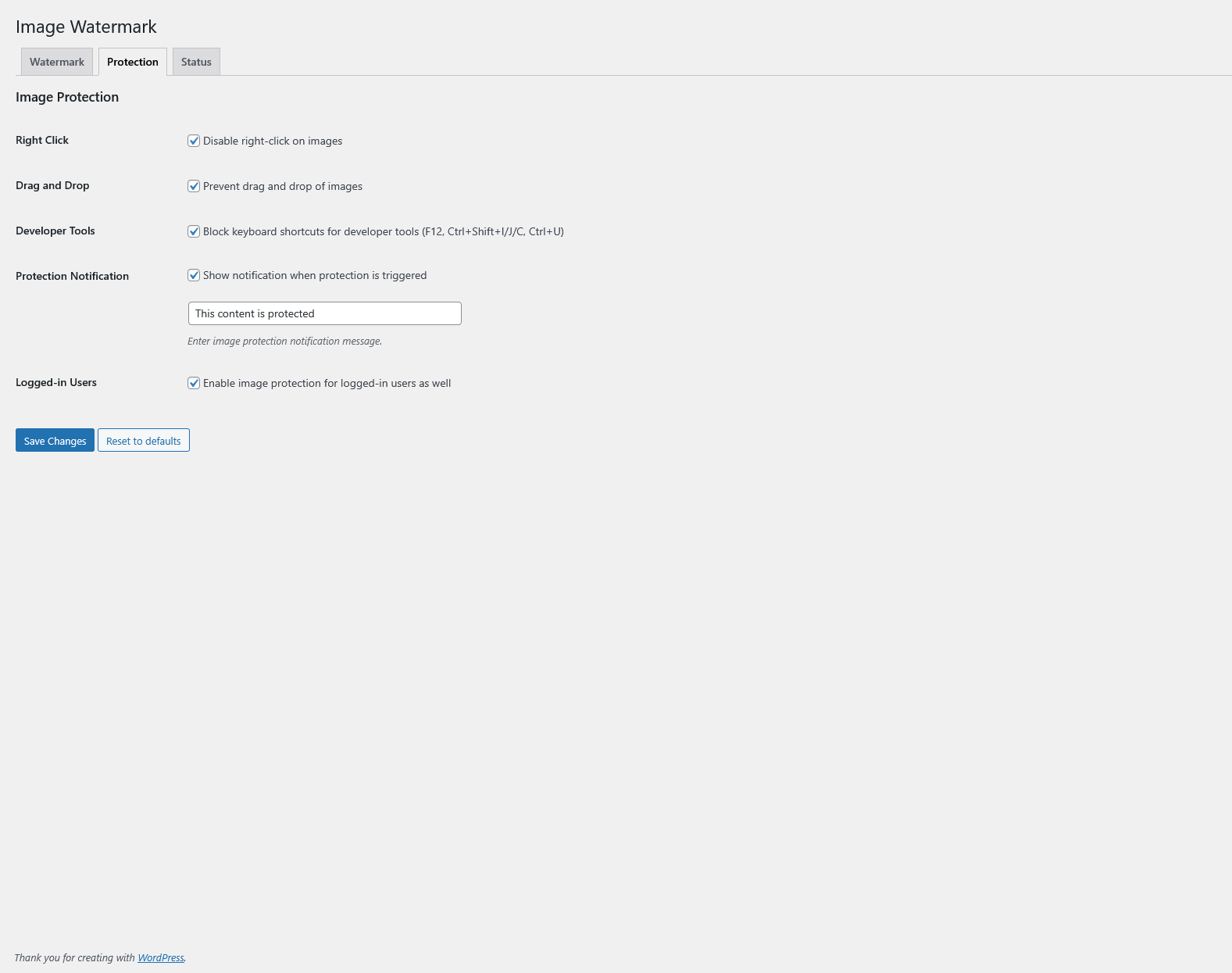
- Image Protection: Browser-side right-click, drag-and-drop, and developer-tools deterrents.
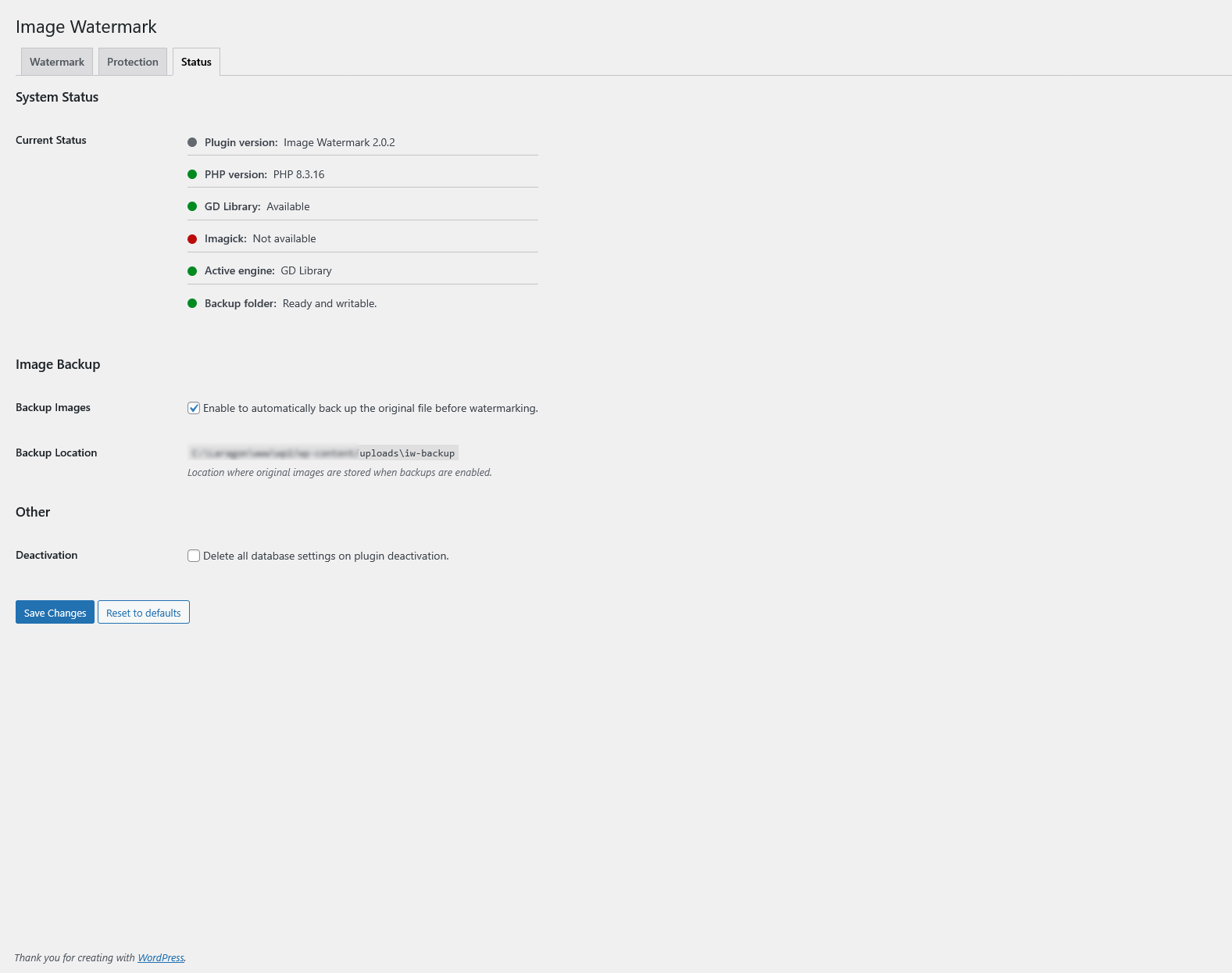
- Status & Diagnostics: Review readiness and the Library’s last run and scan under Settings > Watermark > Status.
- Image Compatibility: JPEG, PNG and WebP support through ImageMagick or GD, with EXIF/IPTC preservation where supported.
Perfect for photographers, bloggers, and businesses looking to safeguard their visual content.
For more information, check out the plugin page, documentation, or support forum.
Feature Breakdown
Watermarking:
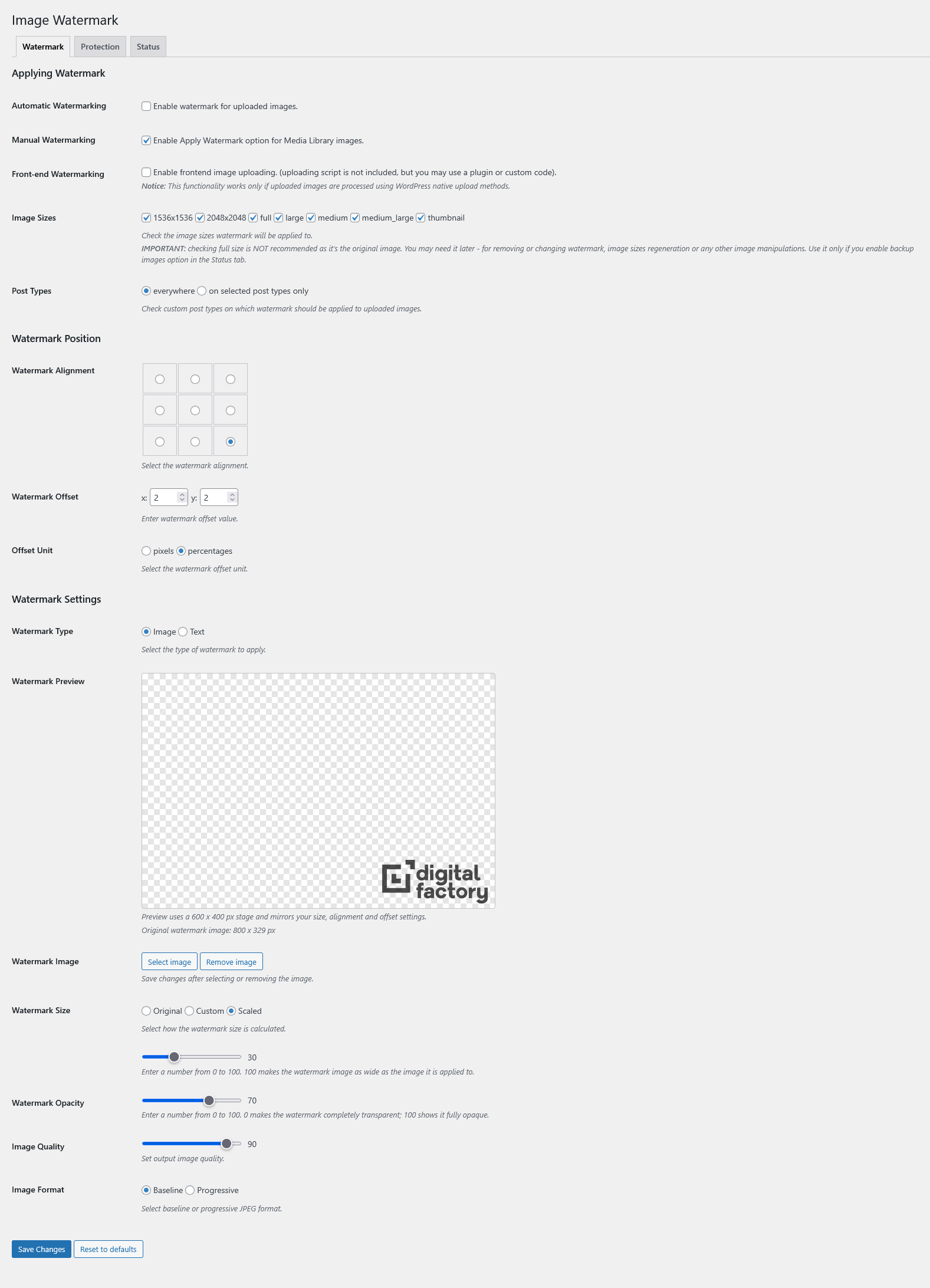
- Support for image-based watermarks (upload custom images as watermarks)
- Support for text-based watermarks (customizable fonts, colors, and sizes)
- Automatic watermarking on new uploads to the Media Library
- Manual and bulk watermarking for existing images (apply or remove via Media Library actions)
Bulk Processing:
- Apply or remove watermarks, or scan your library without changing images
- Select all images, enter attachment IDs, or filter by upload month and watermark state
- Estimate the scope before starting, then follow progress with Pause, Resume and Stop controls
- Review recent runs, saved problems and scan findings, and retry eligible problems
Customization & Settings:
- Flexible watermark positioning (9 alignment options with pixel or percentage-based offsets)
- Three watermark size modes: original, custom dimensions, or scaled to image size
- Clockwise watermark rotation from 0 to 360 degrees
- Adjustable watermark transparency and opacity
- Watermark preview support for image and text watermark modes
- Optional skip rules for small images based on minimum width and height thresholds
- Selective application: Choose specific post types or enable everywhere (including frontend uploads)
- Baseline or progressive JPEG output
- Configurable image quality settings
Backup & Management:
- Optional clean backups before watermarking
- Watermark removal restores images from validated clean backups
- Optional preservation of file timestamps during backup and restore
- Backup storage follows the configured uploads location; server-level access controls must be verified by the site administrator
Image Protection:
- Browser-side deterrents for right-click, image dragging and developer-tools access
- Customizable protection notice/toast message displayed to users attempting to copy images
Technical Information:
- Support for JPEG, PNG, and WebP image formats
- Dual image processing engines: ImageMagick (preferred) with GD library fallback
- EXIF and IPTC metadata preservation (where supported)
- Cache-busting for immediate thumbnail updates after watermark changes
- Settings > Watermark > Status for PHP, engine, backup-folder readiness and the Library’s last run and scan
- Translation-ready with included .pot file
Screenshots
Installation
- Install Image Watermark through Plugins > Add New, or upload its ZIP through Plugins > Add New > Upload Plugin, then activate it.
- Open Settings > Watermark, choose an image or text watermark, and select the image sizes to watermark.
- Adjust the position, size, rotation and opacity. Use the preview to check the appearance.
- Enable Automatic Watermarking for new uploads, Manual Watermarking for existing images, or both. Keep backups enabled if you want to remove watermarks later, then save your settings.
- Test a new upload or a small selection in Bulk Processing. Review the result before processing your library.
Requirements: WordPress 6.3+, PHP 7.3+, and either GD or ImageMagick library. Check readiness under Settings > Watermark > Status; its Library section summarizes the last run and scan.
FAQ
-
How do I watermark new uploads?
-
In Settings > Watermark, choose an image or text watermark, select the image sizes to watermark, and enable Automatic Watermarking. Save your settings and upload a test image. For frontend uploads, also enable Front-end Watermarking.
-
How do I watermark existing images safely?
-
Enable Manual Watermarking in Settings > Watermark. For one image, use the Media Library’s Apply watermark action. For larger selections, open Bulk Processing, choose Apply watermark and the images, then select Estimate before Start processing.
Keep an independent backup and test a small selection first. Confirm the selection when processing all images, and keep the tab open. If you close it, return to Bulk Processing and use Resume.
-
Can I remove a watermark later?
-
Yes, if a validated clean plugin backup is available. Enable backups before applying watermarks; existing valid backups remain usable if you later disable new backups. Removal restores from that backup. Applying a watermark again to an already-watermarked image also starts from its clean backup.
-
Which image formats are supported?
-
JPEG, PNG and WebP. Your server needs ImageMagick or GD; Settings > Watermark > Status shows engine availability.
-
Why was an image skipped or refused?
-
Check the reason in Bulk Processing and review Settings > Watermark > Status for configuration issues. An image may be excluded by your filters, fall below the minimum dimensions, or be the selected watermark image itself. A skip or refusal does not mean it was watermarked.
-
How do I read results?
-
Bulk Processing shows progress and per-image outcomes while this tab processes images. In Recent runs, open Details where available to review saved problems or scan findings. History and problem lists are limited, so they are not a complete audit log. The Library section under Status summarizes the last run and scan.
-
How do I retry?
-
When a finished apply or remove run has saved retryable problems, choose Retry them in its result or Recent runs > Details. This starts a new run and checks those images again. Fix other problems before starting another run. If a result is unconfirmed, wait for the automatic status check rather than resending it.
-
Can I skip very small images?
-
Yes. Enable the small-image threshold option in the Watermark settings and set a minimum width and/or height. Images below the configured limit are not watermarked; the apply is refused.
-
Which scan check should I use?
-
Use Quick check for a faster review of stored information, file sizes and image headers. Full check also decodes images, compares recorded checksums and validates clean sources. Scans change no images, and neither check guarantees that a later operation will succeed.
-
Does frontend image protection fully secure my images?
-
No. The right-click, drag-and-drop, and developer-tools protections are browser-side deterrents. They help discourage casual copying but should not be treated as absolute protection.
Reviews


Contributors & Developers
“Image Watermark” is open source software. The following people have contributed to this plugin.
Contributors
“Image Watermark” has been translated into 9 locales. Thank you to the translators for their contributions.
Translate “Image Watermark” into your language.
Interested in development?
Browse the code, check out the SVN repository, or subscribe to the development log by RSS.
Changelog
2.1.0
- New: Bulk Processing tab to apply, remove or scan watermarks on existing images, with an estimate before you start, live progress and a retry for images that failed
- New: Send Media Library selections of more than 20 images to Bulk Processing
- New: See why an image’s last watermark operation did not succeed in the Media Library
- Tweak: Safer watermark removal and reapply: image sizes are prepared from a clean copy before the live files are replaced
- Tweak: Keep old thumbnail URLs working after image size changes, where possible
- Tweak: Detect and report when another plugin regenerates a watermarked image’s thumbnails
- Fix: Record an automatic upload as watermarked only after WordPress has saved its metadata
2.0.17
- Fix: Keep other plugins’ attachment metadata callbacks running after automatic watermarking
- Fix: Preserve image and thumbnail filenames when removing or reapplying watermarks
- Fix: Apply automatic watermarks when another plugin converts or moves an upload, including scaled images in custom uploads storage
- Fix: Report skipped or failed automatic watermark operations consistently, including uploads whose final file cannot be matched
- Fix: Avoid false operation-limit failures during remove and reapply on sites with many image sizes or multiple operations per request
- Fix: Handle thumbnail ownership checks in media libraries containing audio, video, and documents
- Fix: Clean up remaining plugin data during uninstall when deletion is enabled, while retaining active operation locks
2.0.16
- Fix: Distinguish missing backups from invalid or inaccessible backup paths
- Tweak: Speed up Media Library watermark controls by avoiding full backup image decoding
2.0.15
- Fix: Apply automatic watermarks safely when WordPress 7.1 finalizes client-side media uploads
- Fix: Save scaled watermark size, opacity, and small-image thresholds correctly
2.0.14
- Fix: Preserve the original JPEG file permissions when watermarking rewrites image metadata
2.0.13
- New: Watermark rotation (0-360 degrees clockwise) for image and text watermarks with live preview
- Fix: Recover interrupted watermark operations and safely retry after concurrent requests
- Fix: Require a validated clean backup before apply or remove changes live images
- Fix: Remove only the mapped backup and owned temporary files when an attachment is deleted
- Tweak: Expanded Status tab diagnostics and clearer skipped-operation reasons
- Tweak: Minimum requirements raised to WordPress 6.3+ and PHP 7.3+
2.0.12
- New: Trust diagnostics for watermark readiness in the Status tab
- Fix: Imagick detection and text metrics compatibility
2.0.11
- Fix: Detect Imagick support correctly on servers exposing camelCase methods
- Fix: Prevent false-success apply responses when watermarking fails
- Fix: Read small-image thresholds from the actual image dimensions
2.0.10
- New: Add small-image threshold controls for watermark eligibility
2.0.9
- Fix: Gutenberg auto-watermarking for admin media uploads
- Fix: Admin media frame state guard on post editor screens
- Tweak: Add WordPress PHPUnit coverage and unified test command
2.0.8
- New: Optional preservation of file timestamps for backup and restore
2.0.7
- Fix: GD text alpha cast issue in watermark rendering
- Fix: Text watermark validation blocking legitimate inputs
- Tweak: Shared watermark validation and improved error handling
- Tweak: Enhanced nav tab styling with slug-specific classes
2.0.6
- Fix: “You are not allowed to perform this action” errors with specific validation messages
- Fix: False-positive success responses for apply/remove watermark failures
- Fix: Error message display bug in single-image watermark actions
- Tweak: Enhanced error messages (backup not found, unsupported file type)
- Tweak: Added debug logging capability for watermark actions (WP_DEBUG_LOG)
2.0.5
- Fix: Persist review notice dismissal in options sanitizer to prevent notice reappearing
2.0.4
- New: Apply Watermark To radio control for better UI clarity
- Fix: Settings persistence issue with checkbox options
- Fix: JavaScript scope pollution in settings page
2.0.3
- New: Improved settings UI
- Fix: Apply/remove watermark for post media modal
- Fix: Improve media modal watermark actions UI and messaging
- Tweak: New color picker and switch field type in settings.
2.0.2
- Fix: Preserve PNG transparency when applying watermark using GD library.
- Fix: Prevent applying watermark during watermark image upload
- Fix: Migrate legacy watermark image setting into 2.0.x options
2.0.1
- Fix: Settings save issue for unchecked options and CPT scope
2.0.0
- New: Text watermark support
- New: Enhanced watermark preview with real-time updates.
- New: Support for additional watermark alignment options and percentage-based scaling.
- Tweak: Improved user interface for settings page with modern design elements.
- Tweak: Optimized image processing for faster bulk operations.
- Fix: Enhanced error handling for unsupported image formats.
1.9.1
- New: Bulk Apply/Remove Watermark buttons in Media Library grid view with native styling.
- Fix: Cache-busting for thumbnails and attachment details so watermark changes show immediately.
- Fix: Bulk actions now ignore unsupported/non-image files for safer processing.
1.9.0
- Fix: Watermarked image not refreshing in attachment edit screen after watermark is applied or removed
- Fix: Updated image reload selectors to support modern WordPress attachment details page structure
- Tweak: Complete modern rewrite of Right click blocking feature
1.8.0
- New: WebP image files support
1.7.4
- Fix: Potential security issue with capability check – props WordFence
- Fix: Saving post types settings issue
- Tweak: WordPress 6.5 compatibility
1.7.3
- Tweak: WordPress 6.2 compatibility
- Tweak: PHP 8.2 compatibility
1.7.2
- Fix: Missing admin-media.js file
1.7.1
- Fix: Watermark option not available in Media Library
1.7.0
- Tweak: WordPress 5.9 compatibility
- Tweak: PHP 8.x compatibility
1.6.6
- Tweak: PHP 7.3 compatibility
1.6.5
- Fix: Improved support for PHP 7 and above
- Fix: Backup folders handling of date based organized uploads
1.6.4
- Fix: Transparent PNG issues with ImageMagick library
1.6.3.1
- Fix: The plugin directory upload fix.
1.6.3
- Fix: PNG files watermarking issue
1.6.2
- New: Option to select watermark offset unit – pixels or percentages
- Tweak: Added values to slider settings fields
1.6.1
- Fix: Minor bug with AJAX requests, thanks to JoryHogeveen
- Fix: Prevent watermarking the watermark image, thanks to JoryHogeveen
- Tweak: Code cleanup
1.6.0
- New: Image backup functionality, thanks to JoryHogeveen
- New: Option to remove watermark (if backup is available)
1.5.6
- New: PHP image processing library option, if more than one available.
- Fix: Manual / Media library watermarking not working.
- Fix: Image sizes not being generated properly in GD library.
1.5.5
- Fix: Determine AJAX frontend or backend request
- Tweak: Remove Polish and Russian translations, in favor of GlotPress
1.5.4
- Fix: Use of undefined constant DOING_AJAX
1.5.3
- New: ImageMagic support
1.5.2
- Tweak: Switch from wp_get_referer() to DOING_AJAX and is_admin().
1.5.1
- New: Introducing plugin documentation
- Tweak: Improved transparent watermark support
1.5.0
- Tweak: Plugins setting adjusted to WP settings API
- Tweak: General code cleanup
- Tweak: Added Media Library bulk watermarking notice
1.4.1
- New: Hungarian translation, thanks to Meszaros Tamas
1.4.0
- New: Option to donate this plugin 🙂
1.3.3
- New: Russian translation, thanks to Sly
1.3.2
- New: Chinese translation, thanks to xiaoyaole
1.3.1
- Fix: Option to disable right click on images not working
1.3.0
- Tweak: Manual watermarking now works even if selected post types are selected
- Tweak: UI improvements for WP 3.8
- Fix: Image protection options not saving properly
1.2.1
- New: German translation, thanks to Matthias Siebler
1.2.0
- New: Frontend watermarking option (for front-end upload plugins and custom front-end upload code)
- New: Introducing iw_watermark_display filter
- New: Option to delete all plugin data on deactivation
- Tweak: Rewritten watermark application method
- Tweak: UI enhancements for settings page
1.1.4
- New: Arabic translation, thanks to Hassan Hisham
1.1.3
- New: Introducing API hooks: iw_before_apply_watermark, iw_after_apply_watermark, iw_watermark_options
- Fix: Wrong watermark watermark path
- Fix: Final fix (hopefully) for getimagesize() error
1.1.2
- New: Image quality option
- New: Image format selection (progressive or baseline)
- Fix: Error when getimagesize() is not available on some servers
- Tweak: Files & class naming conventions
1.1.1
- New: Added option to enable or disable manual watermarking in Media Library
- Fix: Apply watermark option not visible in Media Library actions
- Fix: Warning on full size images
1.1.0
- New: Bulk watermark – Apply watermark in Media Library actions
- New: Watermark images already uploaded to Media Library
1.0.3
- Fix: Error during upload of file types other than images (png, jpg)
- Fix: Limit watermark file types to png, gif, jpg
- Tweak: Validation for watermark size and transparency values
- Tweak: Remove unnecessary functions
- Tweak: Code cleanup
- Tweak: Added more code comments
- Tweak: Small css changes
1.0.2
- New: Add watermark to custom image sizes registered in theme
- Tweak: Admin notices on settings page if no watermark image selected
- Tweak: JavaScript enqueuing on front-end
- Tweak: General code cleanup
- Tweak: Changed label for enabling image protection for logged-in users
1.0.1
- Fix: Using image ID instead of image URL during image upload
1.0.0
Initial release